
11 posts tagged with "Debugging"

View all tags

Playwright networkidle timeout? The 401 silent refresh loop

Β· 9 min read

While writing a Playwright E2E check script for a signed-in app, we opened a page with waitUntil: 'networkidle' β€” and 30 seconds later got a TimeoutError, even though the page opens instantly in a browser. The same day, another check script that filters records by date returned nothing for "today", with no error at all.

The app under check: a React + Node.js + Prisma full-stack web app β€” both pitfalls surfaced in its automated E2E check scripts.

TL;DR

  • networkidle timing out β‰  slow page: once the token expires, the frontend's 401 single-flight refresh fetches a new token and replays the request, so the network never gets a 500ms gap with zero requests. Fix: sign a fresh token right before the run, and chain signing and running into one command.
  • Date comparison always false β‰  no data: the date field Prisma returns is a UTC representation; slicing it can never equal a local calendar date. Fix: convert the comparison key to the UTC representation before slicing.

Scenario 1: networkidle keeps timing out? Root cause: the 401 silent refresh loop​

If page.goto with waitUntil: 'networkidle' keeps timing out, in most cases the page is not slow β€” some request is looping silently. In signed-in apps, 401 auto-refresh is the classic culprit.

The symptom​

await page.goto(url, { waitUntil: 'networkidle' });
// TimeoutError: page.goto: Timeout 30000ms exceeded.

The page itself returns HTTP 200 and opens instantly in a browser; switching networks or bypassing the proxy changes nothing β€” a textbook "looks like an environment problem". It only shows up when the check run is interrupted by a long manual step in the middle, and disappears as soon as the token is re-signed.

Root cause: expired token, refresh loop keeps the network busy​

Three layers of cause stacking into one symptom:

  1. The access token is short-lived (15 minutes in our case). When the check run interleaves manual steps β€” tweaking config, editing data β€” anything over 15 minutes leaves the script holding an expired token.
  2. The frontend handles login state with a 401 single-flight refresh: any request that gets a 401 is intercepted, the token is refreshed, and the original request is replayed. Invisible to users β€” expired sessions get silently extended, never logged out.
  3. That mechanism is the natural enemy of networkidle: every failed request immediately produces a replayed request, so the network never gets the "at least 500 ms with no connections" window. The waiter holds out for 30 seconds, then times out.
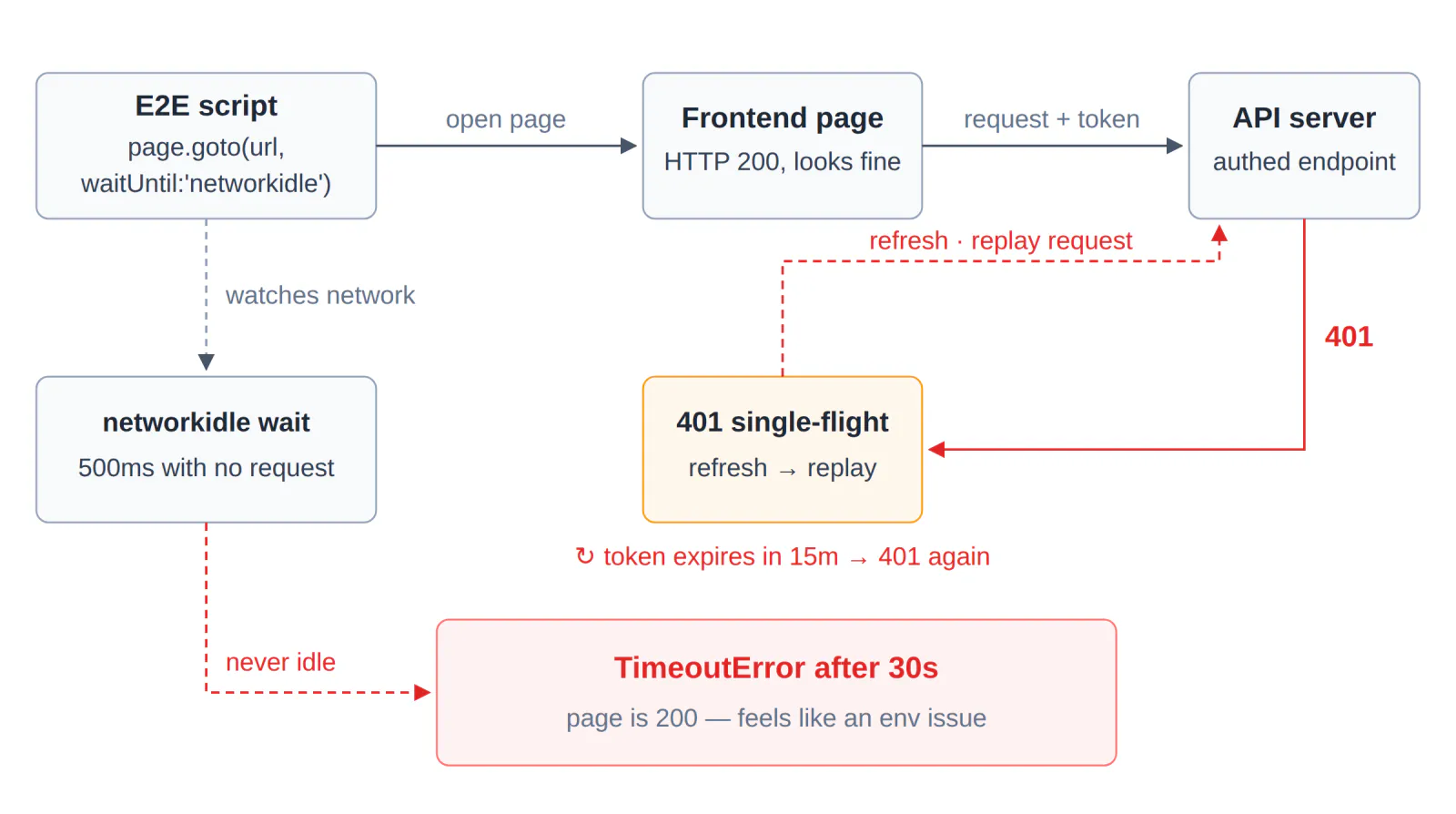
The 401 single-flight refresh loop keeps the network busy; networkidle never fires and times out after 30s

The diagnostic: one curl call makes it show its hand​

Our first guess was also the environment: page 200, everything fine in a local browser β€” for a while it looked like a proxy or DNS issue. The check that settled it was to take the token the script currently holds and call any authenticated endpoint:

curl -s -o /dev/null -w "%{http_code}" \
-H "Authorization: Bearer $TOKEN" \
https://your-app.example.com/api/whoami
# prints 401 β†’ token expired, confirmed

Once the 401 shows up, the whole chain clicks into place: token expired β†’ frontend refreshes and replays β†’ network never idle β†’ networkidle timeout.

The fix: sign a fresh token, chain it with the run in one command​

TOKEN=$(curl -s -X POST https://your-app.example.com/api/auth/login \
-H "Content-Type: application/json" \
-d '{"username":"ci","password":"***"}' | jq -r .accessToken) \
&& node e2e-check.mjs

The only thing that matters: no manual step between signing and running. Our second bite of this bug came exactly from splitting signing and running into two commands β€” we edited some code in between, and by the next run the token was already 15 minutes old. Same symptom, same root. After embedding the signing helper into the check script entry point, this class of timeout has not come back.

Watch out

  • Without auto-refresh on your frontend, the same symptom can come from polling, heartbeats, or auto-retry β€” anything that "sends again after a failure" feeds this loop. The diagnostic approach is identical: first prove that requests are looping.
  • Playwright's docs officially mark networkidle as discouraged and recommend web assertions to assess readiness. If you truly need a quiet network, pair the wait with token keep-alive or a timeout circuit breaker β€” don't let it wait bare.

Scenario 2: date filter always empty? Root cause: toISOString outputs UTC dates​

A check script filters records by "today" and gets an always-empty result with zero errors β€” because the records' date field is a UTC representation, which can never equal a local calendar date.

The symptom​

const todayKey = new Date().toLocaleDateString('en-CA', {
timeZone: 'Asia/Shanghai',
});
// '2026-09-29'

const todays = records.filter((r) => r.date.slice(0, 10) === todayKey);
// todays is always empty β€” no error at all

r.date comes from Prisma and looks like this: 2026-09-28T16:00:00.000Z.

Root cause: the "date" in the DTO is Shanghai midnight written in UTC​

  1. Prisma reads and writes PostgreSQL naive timestamps in UTC. A record for "September 29, Shanghai" is stored as 2026-09-28T16:00:00.000Z β€” 16:00 on Sep 28 in UTC, which is midnight of Sep 29 in Shanghai.
  2. slice(0, 10) takes the UTC calendar day '2026-09-28', while todayKey is the Shanghai day '2026-09-29'. Different frames of reference, never equal.
  3. The nastiest part is the silence: the filter "runs normally", it just returns nothing. The surface symptom is misleading β€” what we noticed first was leftover state accumulating across runs (a "clear today's records" pre-check spinning emptily, clearing nothing). Only by tracing it did we find the data was never lost β€” the comparison key was in the wrong frame. A second, independently written script reproduced it with the same slice comparison, confirming the cause was in the key, not the data.

The fix: convert the comparison key to the UTC representation​

// Convert Shanghai midnight to its UTC representation, take the UTC calendar day
const todayKeyUtc = new Date(todayKey + 'T00:00:00+08:00')
.toISOString()
.slice(0, 10);
// '2026-09-28' β€” same frame as the DTO's stored representation

const todays = records.filter((r) => r.date.slice(0, 10) === todayKeyUtc);

Both sides are now "UTC calendar day" and the comparison works. Note the offset is written explicitly as +08:00 (the business timezone) β€” do not rely on the machine's local timezone, since the script may run in any TZ environment; an explicit offset is the only deterministic choice.

Boundaries and variants​

  • The same root cause has another face on the SQL side: wrapping a UTC time column in a single AT TIME ZONE conversion before filtering re-interprets a UTC value as wall-clock time, shifting the retrieval window by 8 hours and making time-window reconciliation silently miss. The fix is isomorphic on both sides: normalize to a UTC baseline first, then convert.
  • The reverse has the same trap: new Date().toISOString().slice(0, 10) for "today" still yields yesterday's UTC date between 0:00 and 8:00 Shanghai time. For any date-string comparison, ask what timezone frame each of the three values is in β€” stored value, comparison key, display value.

Watch out

The signature of this class of bug: zero errors, reproducible, and it looks like lost data. When a filter comes back empty, print both comparison keys before querying the data β€” in most cases the data was always there; the keys were in different frames.

The common thread: zero-error silent failures​

Neither pitfall raised an error β€” one "just timed out", one "just found nothing", and both got blamed on the environment first. Both fixes are now permanent parts of the automated checks at Life, an AI bookkeeping and health assistant β€” capture expenses by natural language, track mood and medication, end-to-end encrypted. This class of silent failure had shown up before: Zod .strict() silently dropping entire LLM outputs, and a WeChat mini-program image check failing silently β€” a Promise wrapper String()-ing the whole result object into [object Object], again zero errors, just an empty result. The general-purpose move for this class of failure is to give the emptiness a witness: a 401 probe, a printed comparison key β€” make the fault show its hand at the scene instead of guessing.

Frequently asked questions​

Why does page.goto with networkidle keep timing out in Playwright?​

A silent request loop keeps the network busy. When the access token expires, a 401 single-flight refresh interceptor fetches a new token and replays the failed request, so the network never sees the 500ms idle gap networkidle requires, and goto times out at 30 seconds. Verify with one curl call carrying the current token β€” a 401 confirms it. Fix: sign a fresh token and run it in the same command as the check.

Why is networkidle not working in Playwright?​

networkidle needs zero network connections for at least 500 ms, so polling, heartbeats, or auto-retry layers keep resetting the window. Playwright also officially marks networkidle as discouraged β€” prefer web assertions to assess readiness; if you truly need a quiet network, keep the token fresh and add a timeout circuit breaker.

CCLEE

Independent developer, 24 years in e-commerce, focused on grounding AI in real business scenarios.

Work with me

Airflow trigger no dag_run_id? duplicate logical_date 409

Β· 5 min read

Calling the Airflow trigger API, the request goes out cleanly and your logs say "triggered" β€” and later you discover the DAG never ran; the task list is empty.

Encountered this while building AI Ops β€” LLM-powered analytics that surfaces market trends, user behavior, and sales data for precise operational strategy. The platform's backfill script triggers an analysis DAG day by day; one repeated date parameter and the downstream silently misses an entire batch.

Symptom: the API "succeeded", the DAG never ran​

The trigger request completes without raising, the caller's log line says triggered β€” but Airflow shows no corresponding run and nothing executes. What makes this nasty: it never surfaces in the triggerer's errors, only in the downstream question "why is this day missing?". If you searched for "Airflow API trigger no effect", "dagRun not created" or "trigger dag silently fails", same problem.

Root cause: Airflow enforces (dag_id, logical_date) uniqueness on triggers​

Within one DAG, logical_date cannot repeat (dag_run_id is a unique primary key too). Triggering again with an existing logical_date is rejected outright β€” verified on Airflow 3:

POST /api/v2/dags/{dag_id}/dagRuns
HTTP 409
{"detail": {"reason": "Unique constraint violation", ...}}

The response is a 4xx β€” the status code and body both say "not triggered". The failure lives in how the caller consumes that response. The three most common misses:

  • No status-code check: no network exception means "success", and the 4xx body gets discarded;
  • "Got a response" treated as success: resp.json() parsed fine, therefore triggered β€” nobody looks for dag_run_id;
  • Error text lost in log noise: the 409 detail is a constraint-violation blob that no grep keyword matches, so nobody reads it twice.

The fix: a fresh logical_date per trigger, assert dag_run_id in the response​

Two things, both mandatory. On the trigger side, backfills use a distinct logical_date per day (naturally increasing):

from datetime import date, timedelta

for i in range(days):
ld = (date(2026, 1, 1) + timedelta(days=i)).isoformat()
trigger(dag_id, logical_date=ld)

On the caller side, make "response body contains dag_run_id" the only success criterion, with status codes as a secondary signal:

import requests

def trigger(dag_id: str, logical_date: str) -> str:
resp = requests.post(
f"{BASE}/api/v2/dags/{dag_id}/dagRuns",
headers=auth_headers(),
json={"logical_date": logical_date},
)
body = resp.json()
run_id = body.get("dag_run_id")
if not run_id:
# 409 = a run already exists for this logical_date; other 4xx/5xx are failures too
raise TriggerFailed(f"{resp.status_code}: {body}")
return run_id

The beauty of this criterion is that it's status-code agnostic: whatever the server answers, a body without dag_run_id means the trigger did not happen β€” one check covers every failure shape.

Boundary cases: the rejection is sometimes exactly what you want​

Worth stating the other side: if your logical_date is the business date, the unique constraint is your idempotency guard. Backfilling the same day twice β€” the second trigger gets a 409 and no duplicate run is created. In that scenario the move is not "make the trigger succeed" but "clear and rerun the existing run". Don't mix the two:

ScenarioCorrect move
Backfill: one run per dayFresh logical_date per trigger
Rerun the same business dayDon't re-trigger; clear + rerun the existing run
Deciding whether a trigger happenedOnly trust dag_run_id in the body; status code secondary

Also: manual triggers without a logical_date get a manual__<timestamp> run_id and corresponding logical_date from Airflow β€” inherently collision-free. The ones who hit this are callers constructing their own logical_date values.

Watch out

  • Put the dag_run_id check inside your trigger wrapper β€” scattered call sites guarantee one of them skips it, and that one silently drops a batch.
  • Alert on status-code classes, not message keywords β€” the 409 detail is constraint-error text that no grep pattern reliably matches.
  • Business-date logical_dates are good practice: clear semantics plus a free idempotency guard.

FAQ​

What happens if I trigger the same Airflow DAG run twice via the API?​

It gets rejected by a unique constraint: re-triggering with an existing logical_date returned HTTP 409 (Unique constraint violation) with no dag_run_id in the body, and the DAG never ran. Callers that only log the request miss the failure entirely.

Why was my Airflow dagRun triggered but nothing ran?​

The most common cause is a duplicate logical_date β€” Airflow enforces (dag_id, logical_date) uniqueness and answers 409, which an unchecked caller never notices. Rule: a trigger only succeeded if the response body contains a dag_run_id.

Can logical_date repeat in Airflow?​

Not within the same DAG β€” (dag_id, logical_date) carries a unique constraint and dag_run_id is a primary key. The rejection is by design and doubles as an idempotency guard for business-date-based triggers.

CCLEE

Independent developer, 24 years in e-commerce, focused on grounding AI in real business scenarios.

Work with me

Airflow 3 password reset not working? It reads a JSON file

Β· 5 min read

After updating a user password on Airflow 3, requests to /auth/token with the new password still return 401 β€” while the password hash in the database verifiably holds the new value.

Encountered this while building AI Ops β€” LLM-powered analytics that surfaces market trends, user behavior, and sales data for precise operational strategy. The platform's DAG trigger chain rides on this Airflow JWT auth, so a stuck password rotation left the pipeline authorization dangling.

Symptom: password changed, /auth/token still answers with the old one​

The new password gets 401 from /auth/token while the old one still gets 201 β€” every modification step "succeeded", yet the password in effect never changed. This particular rotation was incident response: the old credential had leaked, so every minute of "changed but not effective" was exposure.

The first reflex is the official CLI:

$ airflow users reset-password -u apiuser -p <new>
AttributeError: 'AirflowSecurityManagerV2' object has no attribute 'find_user'

The error points into the FAB (Flask-AppBuilder) auth stack, which smells like a 3.x version bug. CLI broken? Fine β€” bypass it and update the database directly. That detour set up an even deeper trap.

Root cause: SimpleAuthManager never reads the database β€” the password lives in passwords.json​

This deployment's auth manager is not the FAB the error implies, but SimpleAuthManager β€” one command reveals it:

airflow config get-value core auth_manager
# airflow.api_fastapi.auth.managers.simple.simple_auth_manager.SimpleAuthManager

Three layers, and the symptom explains itself:

  • The CLI error is a red herring. The airflow users CLI family belongs to the FAB auth stack; on a SimpleAuthManager deployment its code path crashes with AttributeError. The AirflowSecurityManagerV2 class in the message does exist (as a leftover component), but it has nothing to do with the manager actually handling auth.
  • ab_user is a leftover table. Deployments upgraded from Airflow 2.x carry FAB's user tables. Writing directly β€” UPDATE ab_user SET password=... with a werkzeug generate_password_hash scrypt hash β€” returned rowcount=1, and check_password_hash confirmed the stored hash matched the new password. Yet /auth/token kept answering 401: the table genuinely changed; the auth flow simply never reads it.
  • The real source is a JSON file. SimpleAuthManager takes user passwords from the file pointed to by AIRFLOW__CORE__SIMPLE_AUTH_MANAGER_PASSWORDS_FILE β€” a flat mapping:
{
"apiuser": "<password>",
"admin": "<password>"
}

The username-to-role mapping is declared separately via AIRFLOW__CORE__SIMPLE_AUTH_MANAGER_USERS (e.g. apiuser:admin,admin:admin). The first move in incidents like this should be asking "which manager owns auth?", not patching the symptom "auth is broken".

The fix: edit passwords.json, then force-recreate the container​

Three steps:

  1. Edit the host-side passwords.json (the source file mounted into the container):
python3 - <<'EOF'
import json
d = json.load(open('/root/workspace/ai_dag/deploy/passwords.json'))
d['apiuser'] = '<new password>'
json.dump(d, open('/root/workspace/ai_dag/deploy/passwords.json', 'w'), indent=2)
EOF
  1. Recreate the api-server container. This step is not optional β€” the password file is read only at startup, so editing it does nothing to the running process:
cd /root/workspace/ai_dag/deploy
docker compose up -d --force-recreate airflow-api-server
  1. Once the service is up, verify in both directions β€” the new password must pass AND the old one must fail; both assertions matter:
# health: back to 200 within ~30s of the recreate
curl -s -o /dev/null -w '%{http_code}' http://localhost:8080/api/v2/monitor/health

# new password β†’ expect 201
curl -s -o /dev/null -w '%{http_code}' -X POST http://localhost:8080/auth/token \
-H 'Content-Type: application/json' \
-d '{"username":"apiuser","password":"<new>"}'

# old password β†’ expect 401
curl -s -o /dev/null -w '%{http_code}' -X POST http://localhost:8080/auth/token \
-H 'Content-Type: application/json' \
-d '{"username":"apiuser","password":"<old>"}'

On this incident the results were 201 for the new password, 401 for the old β€” rotation closed. Verifying only "the new password works" without "the old one fails" is the most common loose end in credential rotation.

Watch out

  • Identify the auth manager before touching anything: the output of airflow config get-value core auth_manager decides where the password lives β€” FAB keeps it in the database, SimpleAuthManager in a file. Completely different paths.
  • Editing the password file demands a container recreate: the file is read only at startup, and docker compose restart won't reload it.
  • Services depending on that auth must pick up the new password too and restart β€” otherwise the pipeline sits in a window where the old password 401s and the new one isn't wired in.
  • Recreating the api-server costs seconds to half a minute of downtime β€” do it off-peak, and poll health until it returns 200 before verifying.

FAQ​

Why does the reset-password command fail after upgrading to Airflow 3?​

On 3.x deployments running SimpleAuthManager, the FAB airflow users CLI is gone for good β€” it crashes with AttributeError: 'AirflowSecurityManagerV2' object has no attribute 'find_user' (verified). Run airflow config get-value core auth_manager first to see which manager actually handles auth.

Where does SimpleAuthManager store user passwords?​

In a passwords.json file (flat JSON like {"username": "password"}) pointed to by AIRFLOW__CORE__SIMPLE_AUTH_MANAGER_PASSWORDS_FILE. The file is read only at container startup β€” after editing it you must run docker compose up -d --force-recreate airflow-api-server.

Why doesn't updating the ab_user table change the password?​

ab_user belongs to the FAB auth manager. On deployments migrated to SimpleAuthManager it is leftover data the auth flow never reads β€” we wrote a scrypt hash with rowcount=1 and /auth/token still returned 401.

CCLEE

Independent developer, 24 years in e-commerce, focused on grounding AI in real business scenarios.

Work with me

json.dumps fails on NaN? The error escapes your try/except

Β· 5 min read

A pipeline task dies halfway: the log trace stops mid-step, no error line anywhere β€” the process seems to vanish into thin air.

Encountered this while building AI Ops β€” LLM-powered analytics that surfaces market trends, user behavior, and sales data for precise operational strategy. Analysis tasks start from pandas data and end as JSON in storage; NaN is the most common landmine on that road.

Symptom: a trace that just stops, no error record​

The task is marked failed, but the business log has no exception anywhere β€” the trace reaches a step and ends. The exception did happen; it just exploded outside your try's coverage: the throw came from JSON serialization inside ti.xcom_push, a line sitting outside the business try block (and even wrapped, framework-internal serialization points would still be deeper than your catch radius).

The actual error:

ValueError: Out of range float values are not JSON compliant: nan

If you searched for "json.dumps NaN ValueError", "Out of range float values are not JSON compliant" or "task log stops without error" β€” same family.

Two rulebooks disagree here. Verified behavior matrix:

import json, math

# NaN sails through the Python world
isinstance(float('nan'), float) # True β€” a legal float
float('nan') == float('nan') # False β€” even equality can't see it

# The JSON world: permissive by default, strict mode throws
json.dumps(float('nan')) # 'NaN' (an invalid JSON literal!)
json.dumps(float('nan'), allow_nan=False) # ValueError: Out of range float values...
json.dumps(math.inf, allow_nan=False) # ValueError (Β±Inf equally guilty)

Three points:

  • RFC 8259's number grammar has no NaN/Infinity. Python's json defaults to allow_nan=True and emits a NaN literal β€” a permissive extension producing strings strict parsers downstream will reject. The trap has two layers: blow up now (strict mode), or plant it for later (permissive mode).
  • NaN defeats ordinary guard clauses. It's not None, not 0, and == against itself is False β€” if not value checks all pass, and the data walks all the way to the serializer before exploding.
  • The blast site is framework code. You hand a dict to xcom_push, a logging SDK, an HTTP client β€” serialization happens inside those frameworks, deeper than your try/catch. That's exactly why the trace stops with no error line: the exception never touched your logging hooks, it simply flattened the task.

The fix: sanitize at the boundary, backstop with a task-level hook​

Two lines of defense. First, the data β€” recursively clean before any JSON boundary, mapping NaN and Β±Inf to None:

import math

def json_safe(value):
"""Recursively turn NaN/Β±Inf into None; pass everything else through."""
if isinstance(value, float) and (math.isnan(value) or math.isinf(value)):
return None
if isinstance(value, dict):
return {k: json_safe(v) for k, v in value.items()}
if isinstance(value, list):
return [json_safe(v) for v in value]
return value

import json
payload = json_safe(result_dict)
json.dumps(payload, allow_nan=False) # can no longer throw

After sanitizing, keep allow_nan=False β€” it changes from landmine to tripwire: anything that slipped through now raises inside your own code instead of leaking downstream.

Second, the framework β€” attach a failure hook to the task (an Airflow task failure callback, or a decorator wrapping the whole task callable) so catch-external exceptions also land in the log system. That turns "trace stops, no error" into "trace ends with an error". When triaging existing failures, go straight to the Airflow task logs for the traceback (logs/dag_id=.../task_id=.../attempt=N.log inside the container) rather than the business logs.

Boundary cases​

  • pandas' own to_json maps NaN to null at output time β€” if the whole chain uses it, no sanitizing needed; but the moment data becomes a dict and switches to json.dumps, you own the cleaning. The trap springs exactly when you swap serializers.
  • NaN == NaN is False β€” dedup, assertions and test comparisons all get fooled; only math.isnan detects it.
  • numpy arrays blow up json.dumps too (ndarray isn't JSON-serializable) β€” .tolist() first; the NaNs survive tolist, so cleaning is still required.
  • Semantically, NaNβ†’null is lossy ("measurement failed" becomes "no value") β€” if downstream depends on that distinction, add an explicit marker field instead of hard-converting.

Watch out

  • Only math.isnan detects NaN β€” anything based on == or if not x is unreliable.
  • Sanitize once, at the serialization boundary β€” per-callsite cleaning guarantees one call site eventually gets skipped, and that one reproduces the bug.
  • Use strict mode as a tripwire: after sanitizing, an allow_nan=False error means leaked data β€” a good signal.
  • Framework failure hooks are not optional: they catch the exceptions you can't think of today but will certainly meet tomorrow.

FAQ​

Why does json.dumps raise ValueError on NaN?​

The JSON spec has no NaN/Infinity; with allow_nan=False (strict mode) they raise ValueError: Out of range float values are not JSON compliant. The default allow_nan=True emits an invalid NaN literal, handing the problem downstream.

How do I convert NaN to null before JSON serialization in pandas?​

Walk the data structure recursively and replace float NaN and ±Inf with None before dumps; in pandas itself use df.where(df.notna(), None) or to_json (NaN→null built in). Sanitize at the serialization boundary — json won't do it for you.

Why doesn't JSON support NaN and Infinity?​

RFC 8259's number grammar covers finite numbers only. Python's json module with default settings writes a NaN literal β€” a permissive extension producing invalid JSON that strict downstream parsers reject.

CCLEE

Independent developer, 24 years in e-commerce, focused on grounding AI in real business scenarios.

Work with me

PostgreSQL fe_sendauth in Docker? exec trust vs TCP auth

Β· 5 min read

On the host that runs the database container, docker exec-ing in and running psql connects with no password at all. Run the same username from another container over TCP and it dies instantly with fe_sendauth: no password supplied.

Encountered this while building AI Ops β€” LLM-powered analytics that surfaces market trends, user behavior, and sales data for precise operational strategy. Ops scripts inside the orchestration container reach the analytics database cross-container, and a connection string copied from the exec habit tripped on the very first hop.

Symptom: exec connects, TCP answers fe_sendauth: no password supplied​

Same host, same database, same user β€” two paths, two fates. Verified matrix (Airflow container β†’ PostgreSQL container):

Connection methodResult
docker exec cclhub-db psql -U postgres (in-container socket)Connects, no password
Cross-container TCP, DSN without passwordfe_sendauth: no password supplied
Cross-container TCP, DSN with passwordConnects

If you searched for "fe_sendauth no password supplied", "psql no password error" or "docker postgres connection fails without password" β€” this is it.

Root cause: socket trust and TCP password auth are two different pg_hba paths​

PostgreSQL authentication is matched line by line in pg_hba.conf by connection type, and the official image ships completely different rules for the two paths:

  • docker exec uses the Unix domain socket, covered by a local all all trust-style rule β€” local socket is trusted, no password asked;
  • Cross-container traffic is TCP (a host-type rule), and the official image defaults to scram-sha-256 / md5 password auth.

So the no-password habit built on exec turns into "no password at all" the moment you switch to TCP β€” the literal meaning of fe_sendauth: no password supplied is "the server wants a password and the client supplied none".

Worth separating two often-confused errors: no password supplied means no password was provided; password authentication failed means one was, and it was wrong. The former points at the connection string; the latter at the credential itself β€” different fixes.

The fix: put the password in the DSN, don't copy the exec habit​

Cross-container scripts use a password-carrying connection string, always:

postgresql://postgres:<password>@<db host>:5432/<db>

The recommended source for the password is the DB container's own environment β€” the official image's POSTGRES_PASSWORD exists precisely for initialization β€” avoiding a second hardcode:

PW=$(docker exec cclhub-db printenv POSTGRES_PASSWORD)
psql "postgresql://postgres:${PW}@localhost:5432/postgres" -c "SELECT 1"

Application-side (Python here) it's the same shape, with the DSN in environment management:

import os
import psycopg

DSN = os.environ["APP_DB_DSN"] # postgresql://user:pass@host:5432/db
with psycopg.connect(DSN) as conn:
conn.execute("SELECT 1")

Note that passwords containing reserved characters like @ : / # must be percent-encoded in the URL β€” another place special characters bite; avoiding them in generated database passwords removes an entire class of trouble.

Boundary cases​

  • The error's shape varies by client: an interactive libpq terminal (psql without -t) first prompts Password for user postgres: and then fails with fe_sendauth; connection pools and GUI tools (pgAdmin) surface it as an auth failure in the UI β€” different texts, same root cause.
  • .pgpass files and the PGPASSWORD environment variable are two alternative ways to supply the password; in containerized setups, DSN/env injection is more common than mounting a .pgpass file.
  • You can set pg_hba to trust for TCP too β€” technically possible, and wrong for production: anything that can reach the port gets credential-free access.
  • Auth method version drift: newer official images default to scram-sha-256; very old client libraries may not support it β€” that's a different error class (unsupported authentication method), not "no password supplied".

Watch out

  • Diagnose the connection path first: socket or TCP, and which pg_hba rule it matches, decides whether a password is even requested β€” don't generalize exec behavior to everything.
  • Keep the error semantics straight: no password supplied (missing) and authentication failed (wrong) lead to completely different fixes.
  • Avoid or percent-encode special characters in DSN passwords β€” URL reserved characters silently change how the string parses.

FAQ​

What does fe_sendauth: no password supplied mean?​

The server's pg_hba.conf requires password auth, but the client's connection string carries no password. It is not "wrong password" (that's authentication failed) β€” it's "no password at all"; check whether the DSN is missing its password part.

Why does docker exec psql connect without a password?​

Inside the container psql uses the Unix domain socket, which pg_hba covers with a trust rule; cross-container traffic is TCP and hits a host rule that demands a password. Same command, different path, completely different auth requirements.

How should containerized scripts connect to PostgreSQL?​

Use a DSN with an explicit password β€” postgresql://user:password@host:5432/db β€” read from the DB container's POSTGRES_PASSWORD environment variable. Don't hardcode it and don't expect socket trust to apply over TCP.

CCLEE

Independent developer, 24 years in e-commerce, focused on grounding AI in real business scenarios.

Work with me

jsonb IS NOT NULL passes for JSON null? Use jsonb_typeof

Β· 5 min read

Filtering a jsonb field's "empty" values with IS NOT NULL lets rows whose value is JSON null sail right through β€” the data is empty, yet the predicate says otherwise.

Encountered this while building AI Ops β€” LLM-powered analytics that surfaces market trends, user behavior, and sales data for precise operational strategy. Analysis decision snapshots are stored as jsonb; rows where no rule fired get JSON null written in, which silently corrupted the "has rule output" predicate.

Symptom: IS NOT NULL doesn't catch the "empty" value​

field->'key' IS NOT NULL returns true for rows whose value is JSON null β€” the filter does nothing, and rows that should be excluded leak into the result set. If you searched for "jsonb is not null not working", "jsonb null filter" or "postgres json null check", this is the same issue.

Root cause: JSON null is a valid jsonb value, not SQL NULL​

PostgreSQL has two kinds of "empty" here: SQL NULL means no value exists; JSON null is a legitimate jsonb value. The -> operator retrieves what the key holds β€” for JSON null, that's a perfectly valid value, and IS NOT NULL answers "did I get something back?", not "is it meaningful?". Verified behavior matrix (tested on a PostgreSQL 16 container):

ExpressionResult
('{"a":null}'::jsonb -> 'a') IS NOT NULLtrue
('{"a":1}'::jsonb -> 'b') IS NULLtrue (missing key yields SQL NULL)
jsonb_typeof('{"a":null}'::jsonb -> 'a')'null' (a string)
jsonb_typeof('{"a":1}'::jsonb -> 'b')SQL NULL
'{"a":null}'::jsonb ? 'a'true
('{"a":null}'::jsonb ->> 'a') IS NULLtrue

Two combinations bite most often:

  • IS NOT NULL cannot tell JSON null from a real value β€” the first row, exactly where the misjudgment comes from.
  • Extracting text with ->> and testing IS NULL fails the same way β€” JSON null and a missing key both become SQL NULL (last row). Reaching for ->> to dodge the trap lands you right back in it.

The fix: ? for key existence, jsonb_typeof for value type​

Two different intents need two different tools:

-- "key exists": value irrelevant
SELECT '{"a":null}'::jsonb ? 'a'; -- true

-- "has a real value": assert the JSON type; 'null', missing keys all excluded
SELECT jsonb_typeof(config->'rule_output') = 'array'; -- arrays only
SELECT jsonb_typeof(config->'rule_output') = 'object'; -- objects only

-- find rows that hold a JSON null (data triage)
SELECT * FROM t WHERE jsonb_typeof(config->'rule_output') = 'null';

Our concrete case: the rule engine writes JSON null into decision snapshots when no rule fired, and a downstream count used ->'rule_output' IS NOT NULL as "has rule output" β€” the metric was simply wrong. The fix tightened the assertion to jsonb_typeof(...) = 'array', excluding JSON null, missing keys and every other type in one stroke.

Boundary cases: JSON null is not always wrong​

To be clear: JSON null is a legitimate design β€” "key exists but empty" and "key absent" are different business semantics; an API returning "extra": null is not the same as omitting extra. The data isn't wrong; the predicate is. Three intents, three spellings:

IntentExpression
Key exists (value irrelevant)jsonb ? 'key'
Real value of a given typejsonb_typeof(x) = 'array' / 'object' / ...
Value is JSON nulljsonb_typeof(x) = 'null'

A related trap lives on the update side: jsonb_set(config, '{rule_output}', 'null') writes a JSON null, while jsonb_set(config, '{rule_output}', NULL) deletes the key entirely β€” JSON vs SQL NULL as the argument flips the meaning. For other "query results don't match expectations" hunts, cross-query granularity mismatches causing dangling references are another frequent root cause worth comparing.

Watch out

  • Triage existing data before changing predicates: run jsonb_typeof(...) = 'null' across the table first to size up where JSON null rows come from, then decide whether to fix the query or the writer.
  • Standardize the spelling in your team: even if a field currently always holds a valid array and IS NOT NULL happens to work, use jsonb_typeof assertions uniformly β€” the moment the field's semantics shift, the loose spelling becomes a silent bug.
  • The same applies at the ORM/driver layer: when application code checks "JSON field is not empty", know what your driver maps JSON null to (most languages map it to a language-level null/None) β€” don't conflate the two kinds of empty.

FAQ​

What is the difference between JSON null and SQL NULL in Postgres jsonb?​

JSON null is a valid jsonb value; SQL NULL means the value does not exist. Tested: ('{"a":null}'::jsonb -> 'a') IS NOT NULL returns true; jsonb_typeof returns the string 'null' for the former and SQL NULL for a missing key.

Why doesn't IS NOT NULL filter out empty jsonb values?​

->'key' returns a valid jsonb value for JSON null, so IS NOT NULL is trivially true. Assert the type instead β€” jsonb_typeof(field->'key') = 'array' β€” or check key existence with the ? operator.

How do I tell a JSON null value from a missing key in jsonb?​

Use the ? operator for key existence β€” it returns true even when the value is JSON null. jsonb_typeof returns the string 'null' for a JSON null value and SQL NULL for a missing key, which tells the two apart.

CCLEE

Independent developer, 24 years in e-commerce, focused on grounding AI in real business scenarios.

Work with me

LLM Tool Calls Fail Silently? Enum Drift and Prompt Bloat

Β· 12 min read

While sending a batch backfill request to our bookkeeping assistant in production, the model returned a tool call with valid JSON β€” and nothing happened. The user just saw a generic "didn't catch that" line.

I hit this while building Life, an AI bookkeeping assistant β€” you talk naturally, and the AI extracts amounts, categories, and accounts. The debugging session turned up two structural problems that both fail silently, so I'm writing them up as two scenarios.

TL;DR​

  • Scenario 1: the enum in our tool definition and the enum in our server-side validator were two hand-written copies that had drifted. The model emitted a value that was legal per the definition and the validator rejected it; because the count check lived at the array level, one invalid candidate voided the whole card. Fix: single-source the enum, then validate per item.
  • Scenario 2: to reduce dead-end candidates, we taught the model "every candidate must carry complete arguments." The teaching made outputs longer, and the small model's bad-JSON rate rose from ~6% to 12-28%. Fix: revert the teaching, relax the validation, and let a downstream deterministic guard catch missing arguments.
  • Two rules: paired enums must reference one shared constant; teach routing, not argument extraction.

Two sides: the model sees the definition, your code runs the validator​

In function calling, the tool definition and the parameter validation are two separate pieces of code, and the model only ever sees the first one β€” every silent failure in this post lives in the mismatch between them.

The model never executes anything. Each call, your server sends tool definitions (JSON Schema format) to the model; the model returns a tool name plus an arguments JSON; your code validates it before executing. This means any "set of legal values" exists in at least two places: in the definition sent to the model, and in your validation code.

"Silent failure" here means: no API error, a tool call comes back, the arguments look like valid JSON β€” but the feature doesn't run. In other words, the tool call never takes effect, or the feature fails intermittently. The user sees a generic fallback message; the details sit in server logs. Without log instrumentation, this kind of failure can live in production for a long time.

Before/after flow of two silent LLM tool-calling failures

When the enum in the tool definition and the server-side validation enum aren't the same constant, a "legal" value emitted from the definition side is guaranteed to be rejected by the validation side β€” and an array-level count check amplifies one invalid item into a fully voided card.

The symptom: a failure chain visible only in logs​

Our routing model has a family of disambiguation tools: when the user's input is ambiguous, the model doesn't execute directly β€” it calls a meta-tool that outputs 2-4 candidate intents, which we render as tappable cards. Each candidate carries a tool field whose value must be a real action tool name.

One day, production logs showed a routing failure: the user said "please backfill the missing dates in batch", the model did call the disambiguation tool, and arguments was valid JSON β€” but the whole candidate card was judged invalid, and the user got the fallback line. The confusing part was the contrast: by round six of rephrasing, the same request routed fine. That ruled out "the model is hallucinating" and pointed at a deterministic failure triggered by one specific value.

Root cause: two hand-written enums, plus a count check at the array level​

Digging in found two compounding causes.

Cause one: enum drift. In the tool definition, the candidates' tool enum used the full set of tool names. The server-side validation enum, however, was the full set minus one batch-split tool reserved for an image-only pipeline β€” that tool must never be nominated by the text path, because nominating it would bypass the image pipeline's dedicated contract. The two sets were written in two places, maintained separately:

// Definition side: JSON Schema sent to the model (before the fix)
tool: { type: 'string', enum: [...ALL_TOOLS] } // full set

// Validation side: server-side zod (before the fix, a separate hand-written copy)
const ALLOWED = ALL_TOOLS.filter((t) => t !== 'batch_split') // subset
tool: z.enum(ALLOWED)

The spec the model saw said batch_split was legal, so it dutifully used it; the validator disagreed. The model followed your schema and got rejected by your own validation β€” this isn't a model error, it's the two sides telling different stories.

Cause two: array-level validation voids the whole card. The candidate count constraint sat on the array:

options: z.array(OptionSchema).min(2).max(4)

Zod validates every element of the array, and any single failure fails the entire array. So one invalid candidate (that batch_split) dragged down the whole card β€” three perfectly valid candidates buried with it. The upper layer only had a fallback line; the truth stayed in the logs.

The fix: single-source the enum, then tolerate per item​

Step one, make both sides reference the same constant (a one-line fix):

const DISAMBIGUABLE_TOOLS = ALL_TOOLS.filter((t) => t !== 'batch_split')

// Definition side
tool: { type: 'string', enum: [...DISAMBIGUABLE_TOOLS] }
// Validation side
tool: z.enum(DISAMBIGUABLE_TOOLS)

Step two, turn "one bad element voids the array" into "a bad element only drops itself": run a per-item check inside a preprocess, drop invalid items with a log line, and apply the count floor after filtering:

import { z } from 'zod'

const OptionSchema = z.object({
tool: z.enum(DISAMBIGUABLE_TOOLS),
label: z.string().min(1).max(30),
args: z.record(z.unknown()).optional(),
})

// Per-item tolerance: invalid candidates are dropped, not propagated; every drop is logged
function filterOptions(raw: unknown): unknown {
if (!Array.isArray(raw)) return raw
return raw.filter((item) => OptionSchema.safeParse(item).success)
}

const ArgsSchema = z.object({
// min becomes a "post-filter" floor: only an emptied array rejects the whole card
options: z.preprocess(filterOptions, z.array(OptionSchema).min(1).max(4)),
})

One boundary to be explicit about: per-item tolerance silently discards invalid candidates, so every drop must emit a warn log β€” otherwise bad candidates vanish without a trace and your observability goes blind. Also note min now means "post-filter floor": the card is only rejected when every candidate was dropped, and at that point there's genuinely nothing to render, so falling back is correct.

This "one extra field/value sinks the whole output" problem is a sibling of Zod .strict() silently failing on LLM output: strict validation is right for fully-controlled client input; for model output, tolerance has to go down to the item level.

Scenario 2: after adding "arguments required" teaching, bad-JSON rate went from 6% to 12-28%​

For payload-length-sensitive meta-tools, teaching that forces complete arguments makes outputs longer and directly inflates the small model's bad-JSON rate β€” an A/B test on the same cases measured ~6% rising to 12-28%.

A reasonable-looking teaching​

After scenario one was fixed, we found a follow-up annoyance: some candidates reached the card, and only after tapping did the user discover required arguments were missing, costing another round trip. So we naturally added a teaching β€” "every candidate's args must carry all required arguments for that tool; never nominate a candidate you can't pre-fill completely" β€” injected in three places at once: a rule in the system prompt, the argument description in the tool definition, and the note on a few-shot example.

// Few-shot example (the teaching we later reverted)
{
input: 'delete it',
tool: 'suggest_options',
note: 'ambiguous reference β†’ disambiguate; every candidate\'s args must carry all required
arguments for that tool (e.g. delete_record needs domain); never nominate a candidate
you cannot pre-fill completely',
}

The symptom: the eval gate went red three runs in a row​

We run an eval gate: a fixed set of routing cases, re-run in batch after every change; failure rate over threshold means red. After the teaching shipped, the gate failed three consecutive runs, and the failure shape was highly consistent β€” every failure was a JSON format error on the disambiguation tool call (truncation, extra closing brackets), not a validation rejection; frequency climbed from 2 to 5 per run.

Attribution: an old-build A/B pinned the variable down​

The first suspicion was "the teaching text itself misleads the model." But to actually conclude that, we ran a controlled experiment: old build vs new build, the same 4 cases, 16 runs each, counting the malformed-JSON rate.

BuildBad-JSON rate
Old build (no args-required teaching)~6% (1 of 16; the full gate also flaked 1 case)
New build (teaching in three places)12-28%

That single 6% case deserves a note: the old build also flaked occasionally on the full gate β€” that's the small model's baseline noise, not something the change introduced. The real signal is the jump from 6% to 12-28%: the teaching made every candidate carry full arguments, the disambiguation tool's outputs got significantly longer, and the small model's JSON format error rate amplifies with longer outputs. You cannot see this relationship from a single red/green run.

The fix: revert the teaching, relax validation, guard downstream​

The ruling had three parts:

  1. Strip the args-required teaching from all three places; the few-shot examples teach routing direction only (which inputs go to disambiguation, which candidates to converge on), not argument extraction.
  2. Relax validation to "only validate candidates that carry args": if a candidate includes args, pre-validate them with that tool's own schema β€” invalid values still get dropped; missing args are tolerated on the card.
  3. Let a downstream deterministic exit catch missing arguments: when the user taps a candidate with missing args, the server returns 422 with guiding text, the original card stays, and the user supplies the missing piece in one message.
// Same-ruler validation only for candidates that carry args: invalid values still dropped, missing tolerated
if (option.args !== undefined && !parseToolCall(option.tool, JSON.stringify(option.args))) {
dropped.push(option.tool) // drop + warn log
continue
}

Why is it safe to let missing args onto the card? Because the downstream guard is deterministic β€” it doesn't rely on the model's good behavior, it's a fixed branch in server code. Once code catches the problem the teaching tried to prevent, the teaching is all cost (longer outputs, higher bad-JSON rate). This is the same family as thinking-mode consuming the output budget and returning empty content: small models' structured output is sensitive to payload length. For another silent failure of that kind, see DeepSeek/Qwen structured calls returning empty.

Two rules to keep​

LLM tool-calling reliability comes down to two rules: paired enums must reference a single shared constant, and prompt teaching should cover routing direction only β€” never argument extraction.

Rule one: paired enums must reference a single shared constant. Anywhere a set of legal values appears both in "the definition sent to the model" and in "server-side validation", writing the two copies by hand is forbidden β€” expand both from one constant. The same holds for any paired constraint (field lists, count limits), not just enums.

Rule two: teach routing, not extraction; decide teaching with old-build A/Bs. Every line of teaching adds output length, and small models' format-error rate climbs with length. Routing direction (which input goes to which tool) is cheap guidance worth teaching; argument completeness, catchable by deterministic validation, belongs in code β€” not in the prompt. And when judging whether a teaching should stay, don't conclude from a single red/green run β€” run old and new builds against the same cases a dozen-plus times each and look for the jump in bad-JSON rate.

Watch out

Per-item tolerance isn't free: every drop must be logged (we emit a warn carrying the dropped tool name), otherwise invalid candidates disappear silently and observability goes blind. Likewise, document the "post-filter floor" semantics of min in a code comment β€” if a future maintainer restores the min value as a raw count constraint, the whole-card validation regresses and scenario one's symptom returns as-is.

FAQ​

How does LLM tool calling work?​

The model never runs anything: it returns a tool name plus a JSON payload that must match the tool's JSON Schema, and your server does the validation and execution. The definition you send and the validator you run are two separate pieces of code β€” both failure modes in this post (enum drift voiding a whole candidate card, bad-JSON rate jumping from ~6% to 12-28%) live in that mismatch.

Why is my function calling JSON rejected even though it looks valid?​

Because the enum in your tool definition and the enum in your server-side validator are separate hand-written copies. When they drift, the model emits a definition-legal value and your array-level check (a min(2) on the candidates array, in our case) rejects the entire call β€” one invalid element fails the whole array under zod-style validation. Fix it with a single shared constant plus per-item filtering.

How do I make LLM tool calling more reliable?​

Three rules from our production A/B tests: single-source every paired enum; validate arrays per item so one bad candidate doesn't void the whole card; keep prompt teaching at the routing level instead of forcing full argument payloads. Our measured bad-JSON rate jumped from ~6% to 12-28% when we forced complete arguments, and fell back to the baseline after reverting.

CCLEE

Independent developer, 24 years in e-commerce, focused on grounding AI in real business scenarios.

Work with me

vaul Drawer Won't Close or Scroll? Overflow Blocks the Drag

Β· 6 min read

On a real phone, our filter drawer would open but neither scroll nor dismiss β€” while the exact same drawer worked flawlessly in desktop browsers.

I hit this while building Life, an AI bookkeeping assistant β€” filters and category management both live in bottom drawers. And we fixed this bug twice: after the first fix, a page rewrite rebuilt the drawer JSX from memory, and the same bug was back within hours.

TL;DR​

  • Root cause: the DrawerContent root element is vaul's drag layer (it owns the pull-to-dismiss gesture). With overflow-y-auto on the root (plus max-h-[80vh]-style height caps), the browser judges the touch gesture as "scroll this container" and vaul's drag listeners never receive it β€” the drawer neither scrolls (content clipped by max-h) nor dismisses.
  • Fix: sink scrolling into an inner layer β€” the root keeps only fixed regions (the header), and content goes into a flex-1 min-h-0 overflow-y-auto wrapper.
  • Meta-lesson: re-fixing a structural bug means starting from the template/rule, not from memory of the old JSX.

The symptom: fine on desktop, frozen on real devices​

The drawer is shadcn/ui's Drawer (vaul ^1.1.2 underneath). The failure pattern: on desktop, scroll and dismiss both work; on real devices the content area won't scroll and pulling down won't close β€” the drawer feels frozen. And "can't scroll" always came together with "can't close".

That pairing points at a gesture problem, not a styling problem: on mobile, scrolling and dragging are the same finger doing the same touch move. Whether the browser or the component gets the gesture depends on which element it lands on.

Root cause: the scroll container and the drag layer fight over one gesture​

vaul's pull-to-dismiss relies on touch gesture listeners on the root element: press anywhere, drag down, the root keeps receiving touchmove, and past a threshold the drawer closes.

When the root is also a scroll container, the mobile browser's gesture arbitration steps in first: the finger movement is interpreted as "scroll this container", the browser consumes the touch events, and vaul's listeners never see enough touchmove for a dismiss decision. That's exactly why "can't scroll" and "can't close" appear as a pair β€” the scroll container wins the gesture, vaul loses it, and the content stays clipped by max-h anyway.

The broken structure (from the real diff, after the regression):

{/* Wrong: the root is the drag layer, yet carries scroll + height cap */}
<DrawerContent className="max-h-[80vh] overflow-y-auto px-4 pb-6 text-left">
<DrawerHeader>
<DrawerTitle>Filters</DrawerTitle>
</DrawerHeader>
<div className="flex flex-col gap-4">{/* content */}</div>
<DrawerFooter>{/* actions */}</DrawerFooter>
</DrawerContent>

This renders perfectly in desktop browsers β€” the mouse wheel drives the scroll container directly, and vaul's handle still dismisses. Which is exactly why it slips through development and only surfaces in real-device testing.

The fix: sink scrolling to an inner layer, keep the root fixed​

The correct structure strips scrolling off the root and hands it to an inner container; the header stays on the root:

{/* Right: no overflow on the root, scrolling sinks inward */}
<DrawerContent className="text-left">
<DrawerHeader>
<DrawerTitle>Filters</DrawerTitle>
</DrawerHeader>
<div className="flex-1 min-h-0 overflow-y-auto px-4 pb-6">
{/* content + footer scroll here */}
</div>
</DrawerContent>

Three details that matter:

  1. Zero overflow, zero max-h on the root β€” the drag gesture stays live, so pulling down anywhere dismisses.
  2. flex-1 min-h-0 on the inner layer β€” a flex child defaults to min-height: auto; without pinning it to zero, the content stretches the drawer and the inner layer never produces a scrollbar. min-h-0 is the silent precondition for scrolling to work at all.
  3. The header stays on the root β€” visually the title is fixed while content scrolls; interactively, dragging the handle or title means "close" while swiping the content means "scroll". Each gesture goes to its owner.

After the fix, three Playwright assertions verified it: root overflowY === 'visible', inner scrollTop scrolls independently, and a simulated drag-down dismisses the drawer. All three passed, with no desktop regression.

Why it regressed: rebuilding JSX from memory​

The regression itself is the more instructive part. The first fix (commit a182098, 2026-09-23 08:55) solved "can't scroll on mobile". Later, a page rewrite rebuilt the drawer JSX without consulting the fix β€” whoever wrote it worked from memory of the old code, and max-h + overflow-y-auto went right back on the root. The second fix (f1097b2) landed at 12:10 the same day, under 4 hours after the first.

Structural bugs β€” DOM hierarchy, gesture ownership, scroll container placement β€” are different from ordinary logic bugs: remembering the conclusion isn't enough, because the person rewriting the code isn't necessarily the person who hit the bug, and the memory isn't necessarily theirs either. What works: distill the correct structure into a copyable template with a one-line rule β€” "the DrawerContent root is vaul's drag layer; no overflow or max-h on it; sink scrolling inward" β€” copy the template on every rewrite, and run the gesture assertions once.

Watch out

"Sink scrolling inward" isn't vaul-specific: any component whose root carries drag gestures β€” bottom sheets, draggable dialogs β€” follows the same rule: the gesture layer and the scroll layer must be separate elements. Also remember min-h-0 in flex column layouts: without it the symptom is "no scrollbar appears and the drawer stretches", which is different from the root-overflow symptom. When debugging, first confirm the scroll container itself can scroll, then trace gesture ownership upward.

FAQ​

Why doesn't my vaul drawer scroll on mobile?​

Check whether the DrawerContent root carries overflow-y-auto or a max-h cap. The root element is vaul's drag layer β€” a scroll container on it makes the browser judge touch movement as scrolling, so vaul's drag listeners never fire. Sink scrolling into an inner flex-1 min-h-0 overflow-y-auto container and keep the header fixed on the root.

Why can't I close my vaul drawer by dragging down?​

Same root cause as the scrolling failure: with the scroll container on the root, the browser consumes the touch gesture as scroll and vaul's dismiss gesture never triggers. Once scrolling moves to an inner layer, both symptoms disappear together β€” swiping the content scrolls, dragging the handle or title closes.

Where does the scroll container go in a vaul drawer?​

Inside. The DrawerContent root keeps zero overflow and zero max-h so the drag gesture stays live; content goes into an inner flex-1 min-h-0 overflow-y-auto wrapper. min-h-0 matters: a flex child defaults to min-height auto, and without it the content stretches the drawer instead of producing a scrollbar.

CCLEE

Independent developer, 24 years in e-commerce, focused on grounding AI in real business scenarios.

Work with me

WeChat Promise Wrapper Resolves [object Object]? Take .data

Β· 6 min read

Tapping the photo-recognition button in our mini program failed every single time β€” same on devtools and real devices, regardless of which image was sent. The server only ever said "image recognition failed, please try again later."

I hit this while building Life, an AI bookkeeping assistant β€” photo recognition is one of its quick capture entry points. The fix turned out to be one line; the hard part was the hunt, because every error message along the chain was lying.

TL;DR​

  • Root cause: our own promise wrapper for wx APIs used success: resolve, which resolves the entire callback result β€” and wx.readFile's success result is { data, errMsg } as one object, not the data itself. Downstream, String(b64) turned the whole object into "[object Object]"; after stripping whitespace, 14 junk characters of fake base64 decoded into 9 bytes of fixed garbage and got shipped to the server.
  • Fix: dot into the resolved object (res.data) and throw on non-string values.
  • Hunting tip: when the error body is generic ("invalid params") and leaks no details, add shape diagnostics on the send side (length / charset / magic bytes, zero content) instead of running more format-guessing experiments.

The symptom: 100% failure, independent of image content​

A failure that is 100% reproducible and ignores image content points at the data on the send side β€” not at the recognition model.

The pipeline is: pick image β†’ compress β†’ read as base64 β†’ POST to our server β†’ forwarded to a vision model. The failure pattern was perfectly uniform: devtools matched real devices, every attempt failed. The server log showed only a 400 from the vision gateway:

POST /vision  400  {"error": "invalid params"}

invalid params is a generic body β€” it doesn't say which parameter or how it was wrong. Our routing layer wraps any gateway failure into a 503 "image recognition failed, please try again later", so users and logs were equally uninformed.

Two dead ends, both caused by the generic error​

Generic error bodies steer debugging toward format guessing β€” both of our dead ends started exactly there.

Guess one: non-standard mime type. We first suspected the compressed image used image/jpg (the standard spelling is image/jpeg). Hitting the gateway directly with all three mime variants returned 200 every time β€” disproven. The image and its metadata were fine; the problem was further downstream.

Guess two: base64 line breaks. Next we suspected wx.readFile produced base64 with newlines that the gateway rejected. Injecting \n into a test request reproduced the same error body β€” note the false positive: a generic error means every illegal payload looks identical, so reproducing it proves nothing about what's actually on the wire. We shipped whitespace stripping on both ends anyway (.replace(/\s+/g, '')), retested β€” still 100% failure. Guess two disproven; the stripping stayed as harmless defense.

Both guesses failed for the same reason: they assumed the payload was a malformed image, when in reality what we were sending was not an image at all.

Root cause: the wrapper resolved the whole callback result object​

wx.readFile's success result is one object, { data, errMsg }, and the wrapper resolved it whole β€” what reached the downstream code was never base64.

With guesses exhausted, we switched tactics: add shape diagnostics on the server's failure path β€” metadata only (length, mime, whitespace, charset, decoded byte count, magic hex), never content, zero privacy risk. The next reproduction spat out the truth:

b64Len: 14   charsetOk: false   decodedBytes: 9   magicHex: a1b8de72

A real image's base64 is tens of thousands of characters; this was 14. It decoded to 9 bytes of fixed garbage, and the magic bytes were identical on every request. One more clue locked it in: payloads from two different images were byte-for-byte identical β€” a fixed string, not an image. And a 14-character fixed string is exactly "[objectObject]": "[object Object]" with the space stripped.

Back in the code, every link in the chain looked reasonable:

// Generic wrapper: callback-style API β†’ Promise
const p = (fn) => (opts) =>
new Promise((resolve, reject) => fn({ ...opts, success: resolve, fail: reject }))

// Read file as base64 (before the fix)
const readFileBase64 = (filePath) =>
p(wx.getFileSystemManager().readFile.bind(wx.getFileSystemManager()))({
filePath,
encoding: 'base64',
}).then((b64) => String(b64))

wx.readFile's success callback result is one object: { data, errMsg }. The wrapper's success: resolve resolved that whole object; .then((b64) => String(b64)) received the object and String() coerced it into "[object Object]" β€” zero errors anywhere. Strip, encode, ship β€” everything flowed until the gateway bounced it with a generic 400.

Node's base64 decoding even ignores illegal characters ([ and ]), so the 12 legal base64 characters decoded into exactly 9 bytes of garbage β€” matching the diagnostic log digit for digit.

The fix: dot into the value, throw on non-strings​

The fix is two things: dot into the resolved object (res.data), and throw when the value isn't a non-empty string.

const readFileBase64 = (filePath) =>
p(wx.getFileSystemManager().readFile.bind(wx.getFileSystemManager()))({
filePath,
encoding: 'base64',
}).then((res) => {
const data = res && res.data
if (typeof data !== 'string' || !data) throw new Error('failed to read image')
return data
})

The guard pays off the moment bad data appears: the client gets a clear message instead of a generic 400 from far away. The whole fix was +8/-1 lines in the commit, comment included.

After the fix, recognition worked on devtools and real devices alike, and the 100% failure rate disappeared.

Watch out

When writing promise wrappers for wx APIs, always dot into what you resolve β€” callback result shapes differ per API: .data for readFile, .tempFiles for chooseMedia, .tempFilePath for compressImage. Confirm each one; never write a "universal then" that assumes a shape. And String(someObject) always silently yields "[object Object]" β€” no throw, no warning. Against generic "invalid params" errors, one shape-diagnostic log line (length / charset / magic bytes only) beats any number of guess-and-retest rounds.

FAQ​

Why does my WeChat mini program image recognition always fail?​

A 100% failure rate that ignores image content points at the send side, not the recognition model. Instrument the sender with shape diagnostics β€” payload length, decoded byte count, magic bytes β€” never the content itself. That's how we found our 'base64' was a 14-character junk string.

Why does my promise wrapper return [object Object]?​

Because success: resolve passes the entire callback result object ({ data, errMsg }) as the resolved value, and String() on an object yields "[object Object]" silently β€” no error, no warning. Dot into the result (res.data) and throw when the value is not a non-empty string.

How do I wrap wx callback APIs as promises safely?​

Resolve the whole result, then pick the documented property per API β€” .data for readFile, .tempFilePath for compressImage; there is no universal shape. Add a guard that throws on missing or non-string values so bad data dies at the source instead of surfacing as a generic gateway 400.

CCLEE

Independent developer, 24 years in e-commerce, focused on grounding AI in real business scenarios.

Work with me