Playwright networkidle timeout? The 401 silent refresh loop

While writing a Playwright E2E check script for a signed-in app, we opened a page with waitUntil: 'networkidle' — and 30 seconds later got a TimeoutError, even though the page opens instantly in a browser. The same day, another check script that filters records by date returned nothing for "today", with no error at all.
The app under check: a React + Node.js + Prisma full-stack web app — both pitfalls surfaced in its automated E2E check scripts.
TL;DR
- networkidle timing out ≠ slow page: once the token expires, the frontend's 401 single-flight refresh fetches a new token and replays the request, so the network never gets a 500ms gap with zero requests. Fix: sign a fresh token right before the run, and chain signing and running into one command.
- Date comparison always false ≠ no data: the date field Prisma returns is a UTC representation; slicing it can never equal a local calendar date. Fix: convert the comparison key to the UTC representation before slicing.
Scenario 1: networkidle keeps timing out? Root cause: the 401 silent refresh loop
If page.goto with waitUntil: 'networkidle' keeps timing out, in most cases the page is not slow — some request is looping silently. In signed-in apps, 401 auto-refresh is the classic culprit.
The symptom
await page.goto(url, { waitUntil: 'networkidle' });
// TimeoutError: page.goto: Timeout 30000ms exceeded.
The page itself returns HTTP 200 and opens instantly in a browser; switching networks or bypassing the proxy changes nothing — a textbook "looks like an environment problem". It only shows up when the check run is interrupted by a long manual step in the middle, and disappears as soon as the token is re-signed.
Root cause: expired token, refresh loop keeps the network busy
Three layers of cause stacking into one symptom:
- The access token is short-lived (15 minutes in our case). When the check run interleaves manual steps — tweaking config, editing data — anything over 15 minutes leaves the script holding an expired token.
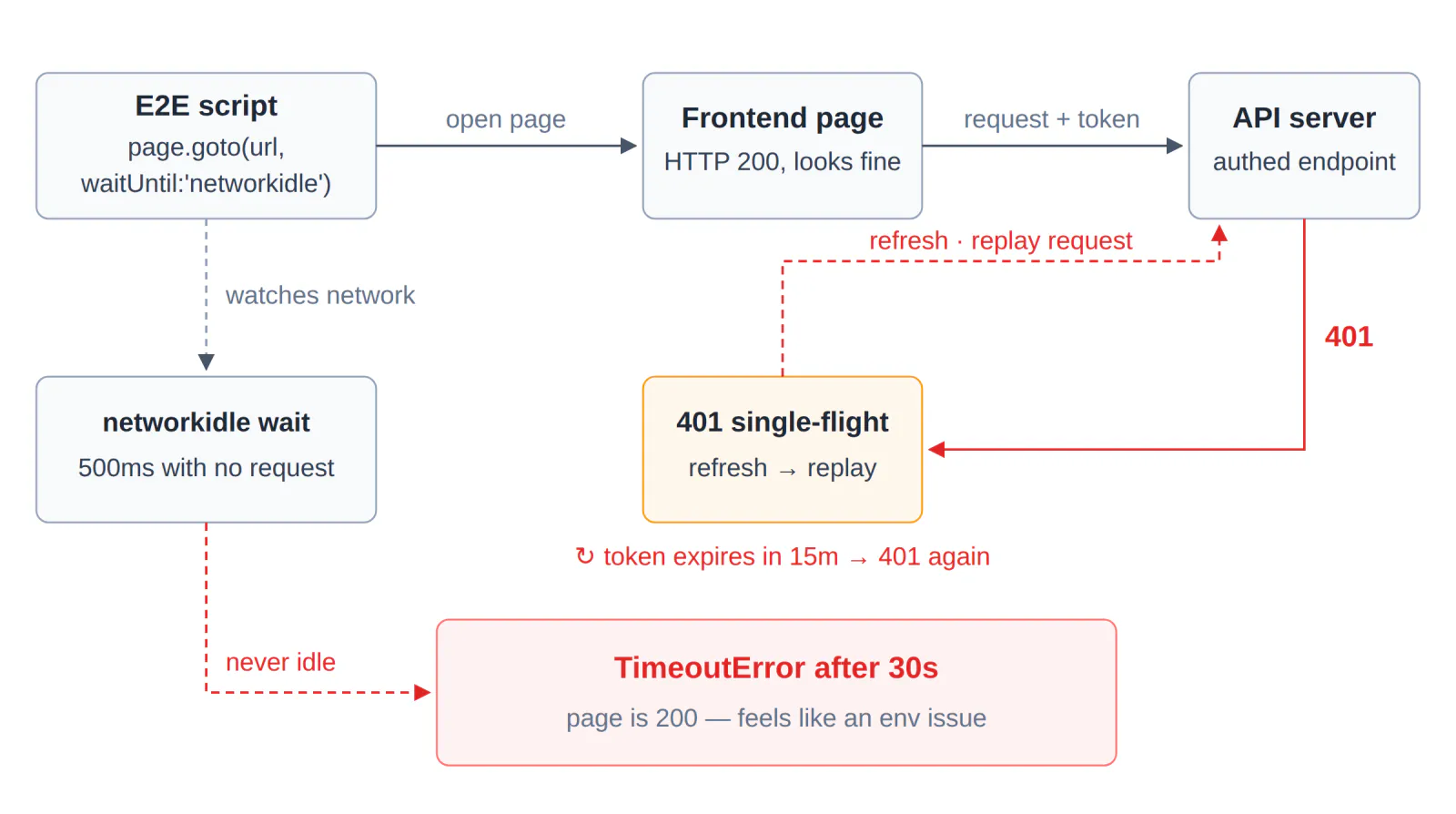
- The frontend handles login state with a 401 single-flight refresh: any request that gets a 401 is intercepted, the token is refreshed, and the original request is replayed. Invisible to users — expired sessions get silently extended, never logged out.
- That mechanism is the natural enemy of networkidle: every failed request immediately produces a replayed request, so the network never gets the "at least 500 ms with no connections" window. The waiter holds out for 30 seconds, then times out.
The diagnostic: one curl call makes it show its hand
Our first guess was also the environment: page 200, everything fine in a local browser — for a while it looked like a proxy or DNS issue. The check that settled it was to take the token the script currently holds and call any authenticated endpoint:
curl -s -o /dev/null -w "%{http_code}" \
  -H "Authorization: Bearer $TOKEN" \
  https://your-app.example.com/api/whoami
# prints 401 → token expired, confirmed
Once the 401 shows up, the whole chain clicks into place: token expired → frontend refreshes and replays → network never idle → networkidle timeout.
The fix: sign a fresh token, chain it with the run in one command
TOKEN=$(curl -s -X POST https://your-app.example.com/api/auth/login \
  -H "Content-Type: application/json" \
  -d '{"username":"ci","password":"***"}' | jq -r .accessToken) \
&& node e2e-check.mjs
The only thing that matters: no manual step between signing and running. Our second bite of this bug came exactly from splitting signing and running into two commands — we edited some code in between, and by the next run the token was already 15 minutes old. Same symptom, same root. After embedding the signing helper into the check script entry point, this class of timeout has not come back.
Watch out
- Without auto-refresh on your frontend, the same symptom can come from polling, heartbeats, or auto-retry — anything that "sends again after a failure" feeds this loop. The diagnostic approach is identical: first prove that requests are looping.
- Playwright's docs officially mark networkidle as discouraged and recommend web assertions to assess readiness. If you truly need a quiet network, pair the wait with token keep-alive or a timeout circuit breaker — don't let it wait bare.
Scenario 2: date filter always empty? Root cause: toISOString outputs UTC dates
A check script filters records by "today" and gets an always-empty result with zero errors — because the records' date field is a UTC representation, which can never equal a local calendar date.
The symptom
const todayKey = new Date().toLocaleDateString('en-CA', {
  timeZone: 'Asia/Shanghai',
});
// '2026-09-29'

const todays = records.filter((r) => r.date.slice(0, 10) === todayKey);
// todays is always empty — no error at all
r.date comes from Prisma and looks like this: 2026-09-28T16:00:00.000Z.
Root cause: the "date" in the DTO is Shanghai midnight written in UTC
- Prisma reads and writes PostgreSQL naive timestamps in UTC. A record for "September 29, Shanghai" is stored as
2026-09-28T16:00:00.000Z— 16:00 on Sep 28 in UTC, which is midnight of Sep 29 in Shanghai. slice(0, 10)takes the UTC calendar day'2026-09-28', whiletodayKeyis the Shanghai day'2026-09-29'. Different frames of reference, never equal.- The nastiest part is the silence: the filter "runs normally", it just returns nothing. The surface symptom is misleading — what we noticed first was leftover state accumulating across runs (a "clear today's records" pre-check spinning emptily, clearing nothing). Only by tracing it did we find the data was never lost — the comparison key was in the wrong frame. A second, independently written script reproduced it with the same slice comparison, confirming the cause was in the key, not the data.
The fix: convert the comparison key to the UTC representation
// Convert Shanghai midnight to its UTC representation, take the UTC calendar day
const todayKeyUtc = new Date(todayKey + 'T00:00:00+08:00')
  .toISOString()
  .slice(0, 10);
// '2026-09-28' — same frame as the DTO's stored representation

const todays = records.filter((r) => r.date.slice(0, 10) === todayKeyUtc);
Both sides are now "UTC calendar day" and the comparison works. Note the offset is written explicitly as +08:00 (the business timezone) — do not rely on the machine's local timezone, since the script may run in any TZ environment; an explicit offset is the only deterministic choice.
Boundaries and variants
- The same root cause has another face on the SQL side: wrapping a UTC time column in a single
AT TIME ZONEconversion before filtering re-interprets a UTC value as wall-clock time, shifting the retrieval window by 8 hours and making time-window reconciliation silently miss. The fix is isomorphic on both sides: normalize to a UTC baseline first, then convert. - The reverse has the same trap:
new Date().toISOString().slice(0, 10)for "today" still yields yesterday's UTC date between 0:00 and 8:00 Shanghai time. For any date-string comparison, ask what timezone frame each of the three values is in — stored value, comparison key, display value.
Watch out
The signature of this class of bug: zero errors, reproducible, and it looks like lost data. When a filter comes back empty, print both comparison keys before querying the data — in most cases the data was always there; the keys were in different frames.
The common thread: zero-error silent failures
Neither pitfall raised an error — one "just timed out", one "just found nothing", and both got blamed on the environment first. Both fixes are now permanent parts of the automated checks at Life, an AI bookkeeping and health assistant — capture expenses by natural language, track mood and medication, end-to-end encrypted. This class of silent failure had shown up before: Zod .strict() silently dropping entire LLM outputs, and a WeChat mini-program image check failing silently — a Promise wrapper String()-ing the whole result object into [object Object], again zero errors, just an empty result. The general-purpose move for this class of failure is to give the emptiness a witness: a 401 probe, a printed comparison key — make the fault show its hand at the scene instead of guessing.
Frequently asked questions
Why does page.goto with networkidle keep timing out in Playwright?
A silent request loop keeps the network busy. When the access token expires, a 401 single-flight refresh interceptor fetches a new token and replays the failed request, so the network never sees the 500ms idle gap networkidle requires, and goto times out at 30 seconds. Verify with one curl call carrying the current token — a 401 confirms it. Fix: sign a fresh token and run it in the same command as the check.
Why is networkidle not working in Playwright?
networkidle needs zero network connections for at least 500 ms, so polling, heartbeats, or auto-retry layers keep resetting the window. Playwright also officially marks networkidle as discouraged — prefer web assertions to assess readiness; if you truly need a quiet network, keep the token fresh and add a timeout circuit breaker.
CCLEE
Independent developer, 24 years in e-commerce, focused on grounding AI in real business scenarios.
Work with me