colima delete Won't Remove Docker Volumes: Only --data Does

While preparing a colima delete to reset a local Docker environment, two official statements collided: the --help text says "This deletes everything", while the official FAQ says container data "should be reinstated on colima start". Same command, two official stories — at least one is wrong.
This verification happened while maintaining a local Docker dev environment (colima 0.10.3 + docker compose on macOS) that runs a shared PostgreSQL development database.
TL;DR
- Since colima v0.9.0, container data (images, containers, named volumes) lives on a dedicated data disk. A plain
colima deleteleaves it alone, and the data comes back on the nextcolima start. colima delete --datais the irreversible one — it deletes the data disk too.- The
--helptext still says "This deletes everything", and plenty of older tutorials describe the old behavior. Trust the behavior: back up your volumes before running any delete. - Where volumes actually live:
~/.colima/_lima/_disks/colima/datadisk(a 100 GiB sparse file, 1.2 GiB actual usage measured).
The symptom: two official stories that contradict each other
colima delete's two official accounts contradict each other: --help says everything is deleted, the official FAQ says the data comes back — at least one is wrong.
colima delete --help sounds alarming:
$ colima delete --help
Delete and teardown Colima and all settings.

Use with caution. This deletes everything and a startup afterwards is like the
initial startup of Colima.

Flags:
  -d, --data   delete container runtime data
The official FAQ entry "How can I delete container data" tells a different story: since v0.9.0, container runtime data uses a different disk, and that disk exists to "guard against accidental data loss after deletion" — the data is reinstated on colima start, and a full wipe requires colima delete --data.
If you carry the "colima delete = volumes gone" expectation, you end up stuck in one of two situations: wanting to reset the VM (upgrade, troubleshooting) but afraid to run delete; or casually adding --data for a "cleaner" reset and later discovering how much that flag actually destroys. Search queries phrase the same question in a dozen ways — "Docker volumes lost", "volumes disappeared after colima delete", "can I recover volumes after colima delete" — and the answer depends on version and flag, not a yes/no.
Root cause: container data moved to a dedicated data disk in v0.9.0
A colima VM has two disks, and colima delete treats them completely differently.
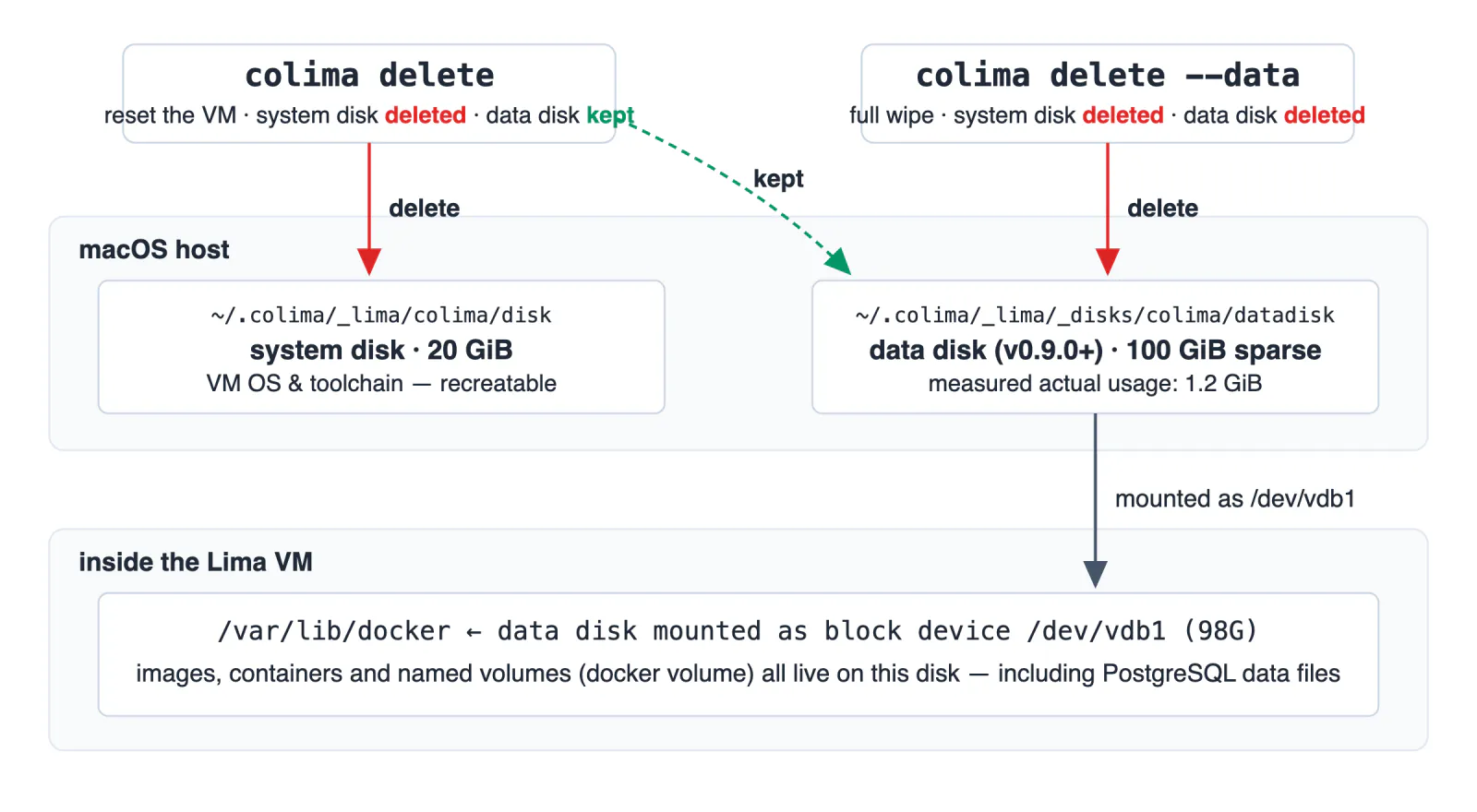
Both disks are visible on the host as plain files:
# System disk: a 20 GiB raw GPT disk image holding the VM OS
$ ls -lh ~/.colima/_lima/colima/disk
-rw-r--r--@ 1 cc  staff    20G Oct 19 20:57 /Users/cc/.colima/_lima/colima/disk
$ du -sh ~/.colima/_lima/colima/disk
1.4G	/Users/cc/.colima/_lima/colima/disk

# Data disk: a 100 GiB sparse file that grows with container data
$ ls -lh ~/.colima/_lima/_disks/colima/datadisk
-rw-r--r--@ 1 cc  staff   100G Oct 19 20:57 /Users/cc/.colima/_lima/_disks/colima/datadisk
$ du -sh ~/.colima/_lima/_disks/colima/datadisk
1.2G	/Users/cc/.colima/_lima/_disks/colima/datadisk
Inside the VM, Docker's data root sits entirely on the data disk:
$ docker info --format '{{.DockerRootDir}}'
/var/lib/docker
$ colima ssh -- df -h /var/lib/docker
Filesystem      Size  Used Avail Use% Mounted on
/dev/vdb1        98G  1.1G   92G   2% /var/lib/docker
$ docker volume ls
DRIVER    VOLUME NAME
local     dev-infra_dev-pg-data
That dev-infra_dev-pg-data is the named volume of the shared PostgreSQL dev database (mounted to /var/lib/postgresql/data in compose) — every byte of it lives on /dev/vdb1, which is backed by the host's datadisk file.
At the source level (colima 0.10.3, Delete in app/app.go), the scope of --data is explicit:
// delete runtime disk if disk in use and data deletion is requested
if diskInUse && data {
    log.Println("deleting container data")
    if err := limautil.DeleteDisk(); err != nil {
        return fmt.Errorf("error deleting container data: %w", err)
    }
    // ...
}
data is the --data flag. Without it, this branch never runs — what gets deleted is the VM system disk and the configuration, while the data disk file stays on the host. That is also why the FAQ wording changed: colima's own upgrade/troubleshooting docs have long recommended colima delete + colima start to rebuild the environment, and before v0.9.0 that path destroyed your data along with it. v0.9.0 split "delete the environment" from "delete the data", and the FAQ says the new layout exists to "guard against accidental data loss after deletion".
colima delete vs colima delete --data: two delete semantics
Without --data, only the system disk goes — the data disk stays put. With --data, both go.
| Command | System disk _lima/colima/disk | Data disk _disks/colima/datadisk | Named volumes |
|---|---|---|---|
colima delete | deleted | kept | back on next colima start* |
colima delete --data | deleted | deleted | unrecoverable |
One more detail hides in the confirmation prompt: the source only adds the second confirmation — "this will delete ALL container data" — when the data disk is absent or --data was passed. A plain colima delete never shows that warning, because by design it never touches your data.
* Honest caveat: "data comes back after a plain delete" comes from the official FAQ plus the source-code branch above; no full delete→start round-trip was run on the 0.10.3 machine tested here — not worth gambling a working dev environment on. If you want to test it yourself, back up first using the next section.
Three situations still lose data:
- colima 0.8.x and earlier: no dedicated data disk — everything sits on the system disk, so a plain delete really does delete everything. The old advice was true in that version range.
- Passing
--data, or manually runninglimactl disk delete. - Skipping colima delete entirely and running
rm -rf ~/.colima: the data disk file lives inside that directory — more thorough than--data, taking configuration and data alike.
The fix: back up the named volume before any delete
The generic packing method works for any volume, any storage engine:
# Back up: pack the volume contents into the current directory
docker run --rm -v dev-infra_dev-pg-data:/data -v "$PWD":/backup alpine \
  tar czf /backup/dev-pg-data-$(date +%F).tgz -C /data .

# Restore: let compose recreate the empty volume first, then unpack
docker run --rm -v dev-infra_dev-pg-data:/data -v "$PWD":/backup alpine \
  sh -c 'cd /data && tar xzf /backup/dev-pg-data-2026-10-19.tgz'
For databases, prefer a logical backup — cleaner than copying the data directory and stable across versions:
# Back up (life is the actual database name in this environment — use yours)
docker exec dev-pg pg_dump -U postgres -Fc life > life-$(date +%F).dump

# Restore
docker exec -i dev-pg pg_restore -U postgres -d life < life-2026-10-19.dump
Often the real motive behind a delete is "the disk is full" — a path that needs no delete at all:
- Reclaim at the container layer:
docker system prune - Shrink the sparse file:
colima ssh -- sudo fstrim -a(v0.5.0+ also releases unused space on restart) - The disk can only grow, never shrink: edit
disk:in~/.colima/default/colima.yaml, thencolima restart(automatic since v0.5.3)
A four-step pre-delete checklist:
colima version— confirm 0.9.0 or newer; otherwise treat it as the old architecture and back up everything- Re-check the command for
--data - Verify the backup on disk (
tar -tlisting orpg_restore --listreads back) - Note the compose project name — it prefixes the volume name (
dev-infra_dev-pg-datacomes from thedev-infradirectory)
Unrelated but in the same neighborhood: local Dockerized databases have another class of pitfall where a silently occupied port makes you connect to the wrong instance — see Two WSL2 + Docker networking traps.
Watch out
colima delete --datais irreversible. There is no recycle bin.- On colima 0.8.x and earlier, a plain
colima deleteis equally irreversible. - Do not use
rm -rf ~/.colimaas a "reset" — on the data-disk architecture it equals--dataplus losing your configuration.
FAQ
Does colima delete remove Docker volumes?
Not since v0.9.0. Container data sits on a dedicated data disk that a plain colima delete leaves untouched — the data comes back on the next colima start. Only colima delete --data wipes that disk, and that is irreversible.
Where does Docker store named volume data on a Mac with colima?
Inside the colima VM's data disk image: ~/.colima/_lima/_disks/colima/datadisk. On the machine tested here it is a 100 GiB sparse file with an actual usage of about 1.2 GiB, mounted inside the VM at /var/lib/docker. Back up volume contents with tar rather than handling the image file directly.
Why is Docker taking up so much disk space on macOS?
Separate displayed size from real usage: the datadisk shows 100 GiB but du measures about 1.2 GiB. Clean up with docker system prune, then run colima ssh -- sudo fstrim -a to shrink the sparse file (v0.5.0+ also reclaims unused space on restart). The disk can only grow, never shrink: raise disk in colima.yaml and run colima restart (automatic since v0.5.3).
How do I back up and restore a Docker named volume?
Pack it with a one-off alpine container: docker run --rm -v VOLUME:/data -v "$PWD":/backup alpine tar czf /backup/vol.tgz -C /data . — swap tar czf for tar xzf to restore. For databases like PostgreSQL prefer a pg_dump logical backup; it is cleaner than copying the data directory and survives version upgrades.
CCLEE
Independent developer, 24 years in e-commerce, focused on grounding AI in real business scenarios.
Work with me