AutoListing AI (WooCommerce × Taobao/1688)
Automated product scraping and listing system. One-click scrape from Taobao/1688, AI-generated English descriptions and pricing, human review, then publish directly to WooCommerce.
What Is This
Cross-border sellers sourcing from Taobao/1688 need to: manually translate titles and descriptions, fill in specs and variants one by one, download and upload images individually, calculate exchange rates and pricing by hand — a product with 10 variants takes about 30-45 minutes to list manually. 50 products would take over a week.
AutoListing AI compresses the entire workflow to about 3-5 minutes per product.
How It Works
Browser Extension Scrape → Backend Receive → AI Process → Human Review → One-Click Publish
Step 1: Scrape — The browser extension scrapes titles, specs, variants (with prices), and images from Taobao/Tmall/1688 product pages in one click. Data is sent to the backend automatically. Re-scraping updates existing records without creating duplicates.
Step 2: AI Processing — GPT-4o Vision analyzes product images to generate English naming and attributes. GPT-4o Text generates English descriptions and spec tables. The system fetches real-time exchange rates (CNY→SGD), applies markup pricing (prices ending in 8), and auto-maps to WooCommerce attributes and custom fields.
Step 3: Human Review — Review all AI-generated results in the web interface. Edit any field, then approve or discard.
Step 4: One-Click Publish — Images are SEO-renamed and uploaded to the WordPress media library. A WooCommerce variable product is automatically created with all variants, attributes, tags, and ACF fields. Results are fully traceable.
Core Capabilities
Smart Scraping — Chrome extension for one-click scraping on Taobao/Tmall/1688 product pages. Auto-detects platform and extracts product IDs for deduplication (re-scraping auto-updates).
AI Vision + Text Dual-Model Processing — Vision Model analyzes product images to generate English naming, style, category, design description, color, shape, material, room type, and tags. Text Model generates full English product descriptions (HTML), spec tables, and variant name translations. Nordic-style naming system generates unique brand-style names with built-in deduplication. AI provider is configurable: API Key, Base URL, and Vision/Text models are all customizable — not locked to OpenAI (supports Qwen, DeepSeek, and other compatible APIs).
Real-Time Exchange Rate — Automatically fetches CNY→SGD rates from a public exchange rate API with 1-hour cache TTL. Rate source is configurable. The review interface shows the full pricing breakdown: CNY original price → SGD conversion → × markup → rounded final price.
Auto Pricing + Flexible Manual Adjustment — Configurable markup multipliers (Taobao 4.5x / 1688 6.0x, differentiated by channel margin). Prices ending in 8 (psychological pricing). Supports per-SKU manual price override. Batch pricing and individual pricing can be freely combined.
Auto Attribute Mapping — 7 WooCommerce global attributes auto-matched (color type, size, shape, style, material, room, light fixture type). 5 ACF custom fields auto-filled. Lookup-table mapping ensures consistency with existing site options.
Image Collection & SEO — Browser-side image downloading (bypasses CDN rate limits) with three categories: main images, SKU variant images, detail images. On publish, images are SEO-renamed (style-description-category-room-sequence) and uploaded to WordPress media library with alt-text.
Full WooCommerce Product Creation — Creates variable products, batch creates variants, 7 global attributes + variant attributes, ACF fields + tag auto-association, WC category auto-matching.
Multi-Store Management — Manage multiple WooCommerce sites, each with independent WC credentials and WP accounts. Select target store at publish time. Same product can be published to different stores. Store connection testing: one-click verify WC API credentials. Upload logs recorded per store, each publish result traceable.
Efficient Review Workflow — Split-panel layout: product list on the left (filter/search/paginate) + detail editing on the right, no page navigation needed. Keyboard shortcuts: ↑↓ switch products, S save, A approve, D discard. Auto-advances to next product after approve/discard. Original text comparison: collapsible Chinese original title and description. Bidirectional source links: jump to original platform product page + jump to WC product page after publishing.
Examples
Pricing Calculation
Taobao product CNY 49.9
× Real-time rate 0.18 (CNY→SGD)
× Channel markup 4.5x (Taobao)
= SGD 40.42
→ Round to 8 → SGD 48
Same product from 1688 with different markup: CNY 49.9 × 0.18 × 6.0 = SGD 53.89 → SGD 58
AI Generation
| Content | |
|---|---|
| Original Chinese title | 北欧风格后现代创意客厅吊灯 黄铜分子灯多头餐厅灯饰 |
| AI-generated English title | Freja Modern Molecular Pendant Light |
| AI-generated description excerpt | Transform your living space with the Freja Modern Molecular Pendant Light — a striking fusion of art and illumination. Inspired by molecular structures, this statement piece features interconnected brass-finish arms that radiate warmth and contemporary sophistication. |
AI identified molecular structure, brass material, and modern style from the product image, then auto-generated the Nordic-style name "Freja", creative descriptor "Molecular", and category "Pendant Light".
Image SEO Naming
Original filename (meaningless): img_20240315_a3x7k.jpg
After SEO renaming: modern-matte-black-pendant-light-living-room-01.jpg
Naming convention: {style}-{descriptor}-{category}-{room}-{sequence}.jpg, all lowercase, hyphen-separated. Alt text auto-generated as "Modern Matte Black Pendant Light Living Room".
Attribute Mapping
Using the "Brass Molecular Pendant Light" as an example, AI analyzes the image and auto-maps:
| WooCommerce Attribute | AI Detection | Mapped Value |
|---|---|---|
| Color Type | Brass | Brass |
| Style | Modern minimalist | Modern |
| Material | Metal/Brass | Metal/Aluminum |
| Shape | Molecular structure | Geometric |
| Room | Living/Dining room | Living Room |
| Light Bulb Fitting Type | E27 socket | E27/E14 |
| Size Type | Max size 65cm | 61cm-80cm |
ACF custom fields auto-filled: light fitting E27/E14, color Brass, size 65cm, material Metal/Aluminum, warranty 1 year product warranty.
Efficiency Comparison
| Step | Manual | Automated |
|---|---|---|
| Product info collection | Copy & paste, 5-10 min each | One-click scrape, <5 sec each |
| Title translation | Manual translate + proofread, 3-5 min | GPT-4o auto-generate, <10 sec |
| Product description | 15-20 min each | GPT-4o auto-generate HTML, <10 sec |
| Exchange rate + pricing | Look up rates + calculator + fill individually | Real-time rate + auto markup, instant |
| Attribute filling | Look up tables one by one, 5-10 min | Auto lookup mapping, instant |
| Image processing | Download + rename + upload each | Auto download + SEO naming + upload |
| Variant creation | Add one by one manually | Batch auto-create with SKU |
| Single product total | 30-45 minutes | ~3-5 minutes review |
| 50 products | ~2 weeks | ~half a day |
Who Is This For
Cross-border sellers — Sourcing products from Taobao/1688 and selling through WooCommerce stores. Need batch listing to reduce manual translation and data entry. Works for any category — lighting, home decor, accessories, and more. The current version is deeply optimized for the lighting category (with dedicated logic for light fixture types, Nordic-style naming, etc.); other categories can be customized.
Service providers & tech teams — Operations agencies needing to batch-list products for clients, or tech teams wanting to integrate scrape→process→publish capabilities into their own workflows. Can be embedded as a standalone module, API-driven.
Usage Guide
1. Configure WooCommerce Store
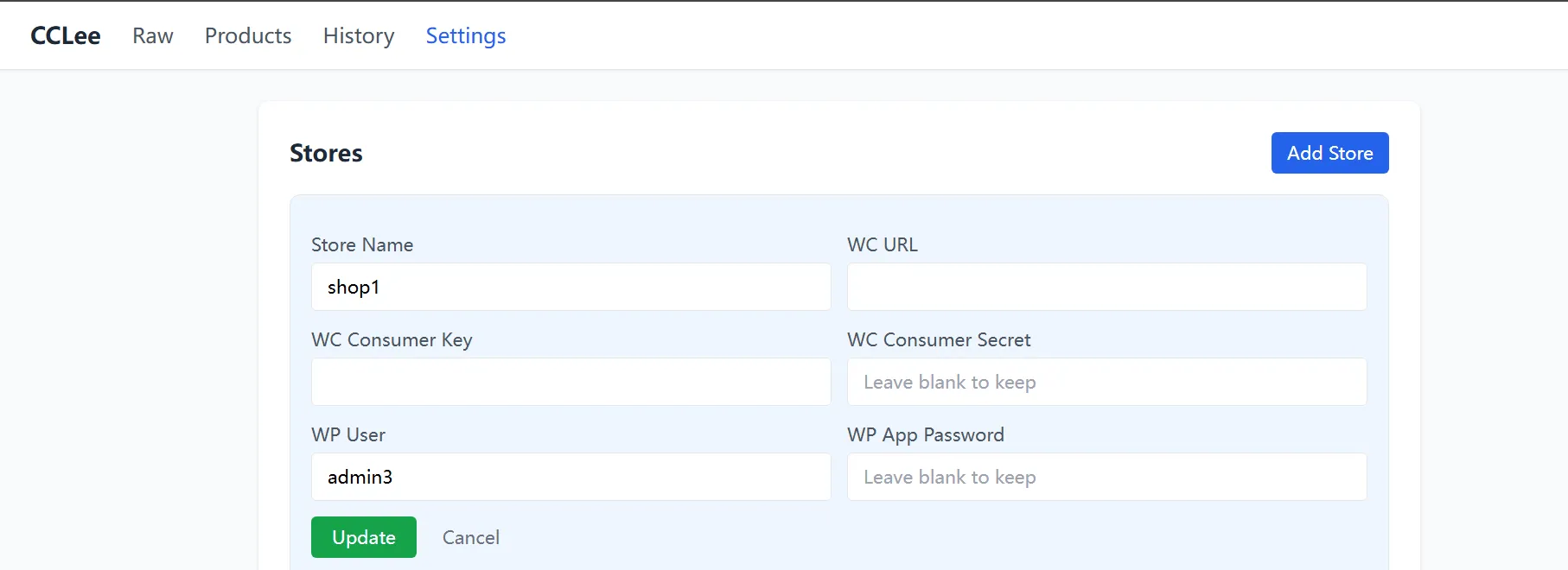
First-time setup requires configuring WooCommerce store credentials and AI provider.
The publishing flow uses two sets of authentication:
- WC Consumer Key + Secret: for WC REST API (creating products, variants)
- WP-Admin path: WooCommerce → Settings → Advanced → REST API → Add key
- WP User + App Password: for WordPress Media REST API (uploading images)
- WP-Admin path: Users → Profile → Application Passwords
Click Add Store and fill in Store ID, WC URL, CK/CS, WP User, WP App Password. Click Test to verify the connection. Supports adding multiple stores — select target store at publish time. Edit to update existing store credentials, Delete to remove a store (does not affect already-published products).
2. Configure AI Provider
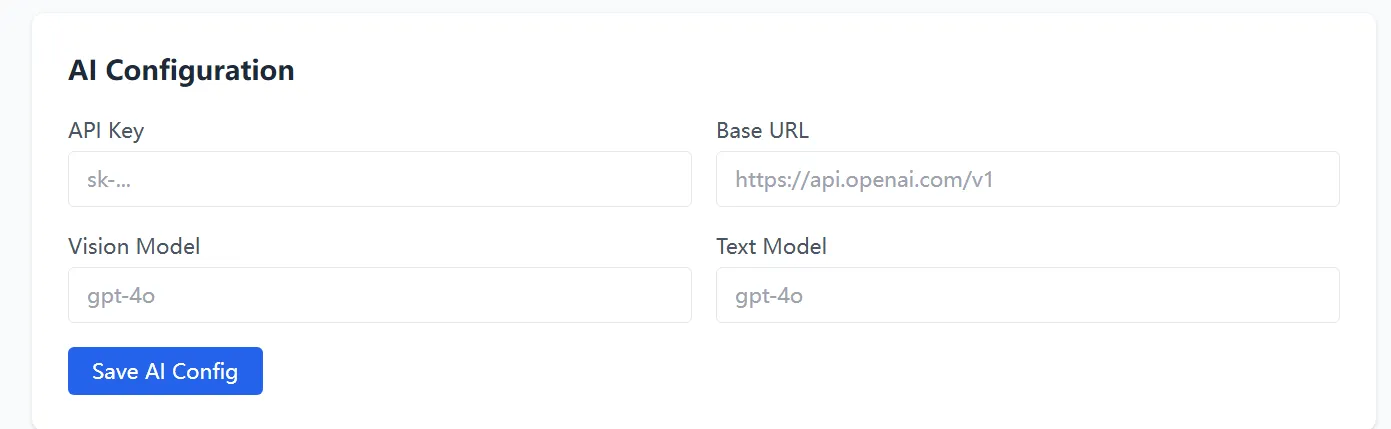
Supports all models compatible with the OpenAI API format. Two models handle different tasks:
- Vision Model: analyzes product images to generate English naming, style, category, color, material, and other attributes
- Text Model: generates English product descriptions (HTML), spec tables, variant name translations
Fill in API Key, Base URL, and model names, then click Save AI Config. Takes effect immediately. Not locked to OpenAI — Qwen, DeepSeek, and other compatible APIs all work.
3. Scrape Products
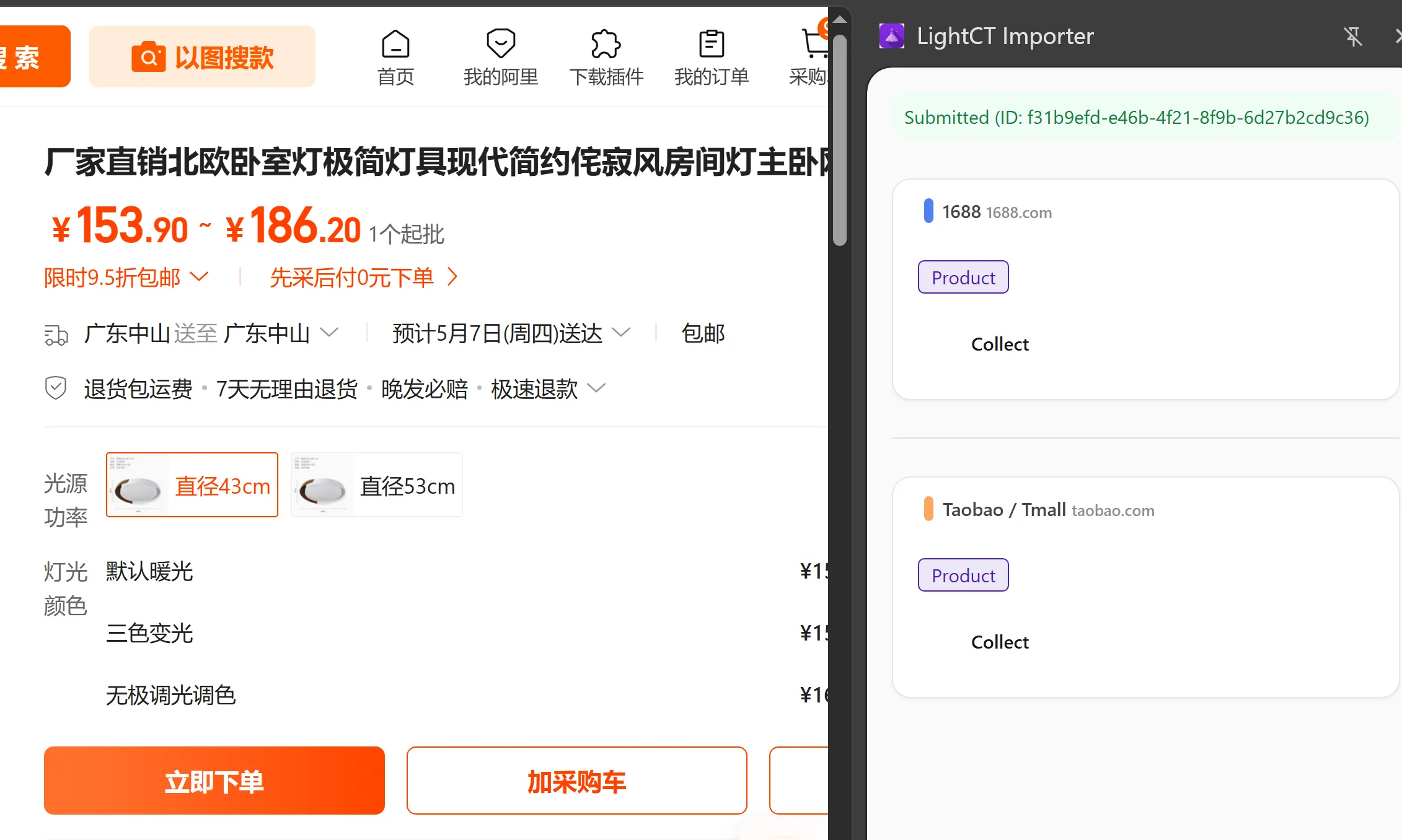
Click the extension icon on any Taobao/Tmall/1688 product page to scrape the current product.
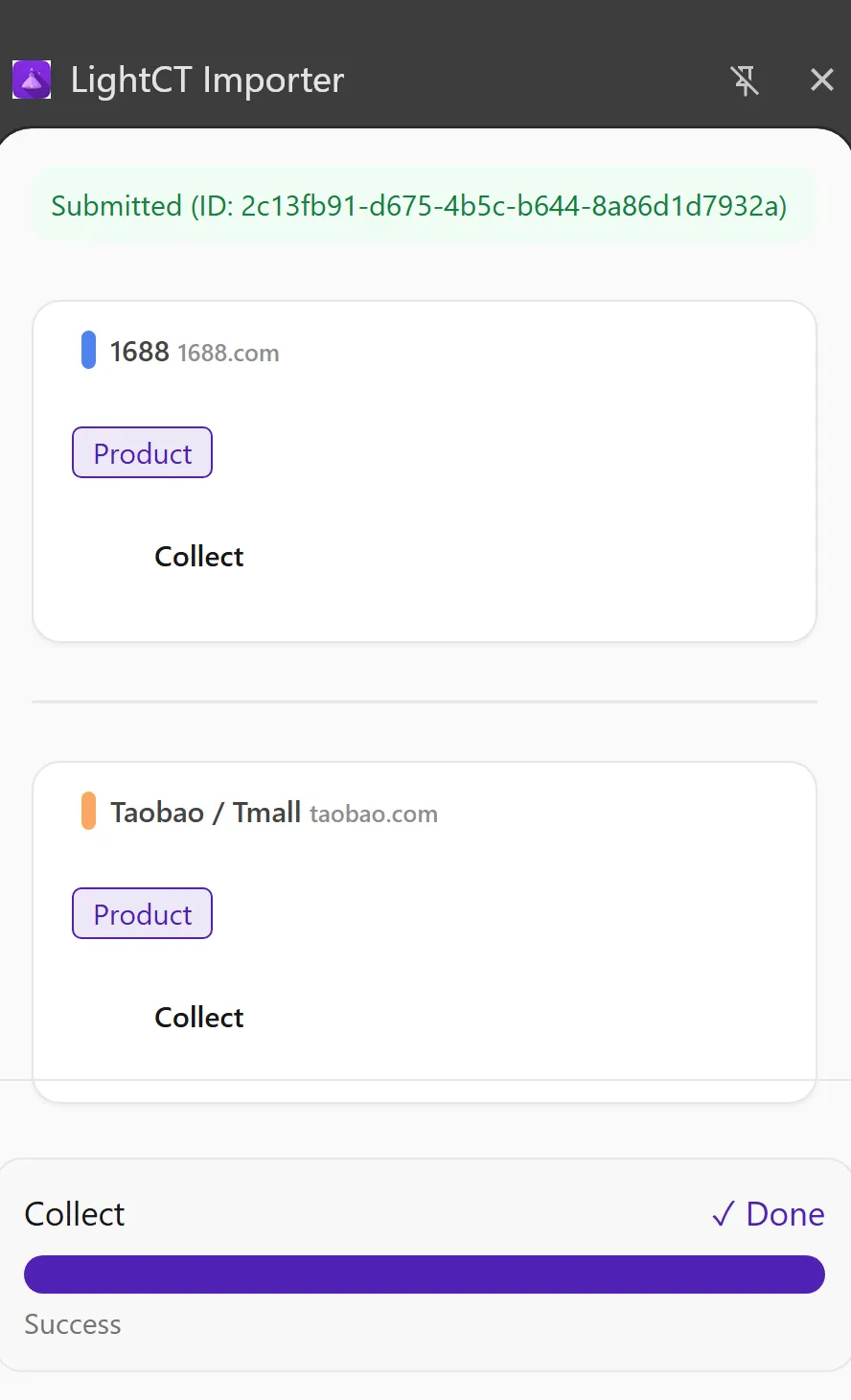
Scraping simulates human browsing behavior. A breathing light indicator shows progress until "Done" appears. Product data (title, specs, variants, prices, images) is automatically sent to the backend and appears on the Raw page for AI processing.
If you scrape the same product again (same platform + product ID), the system auto-updates the existing record without creating duplicates.
4. AI Processing
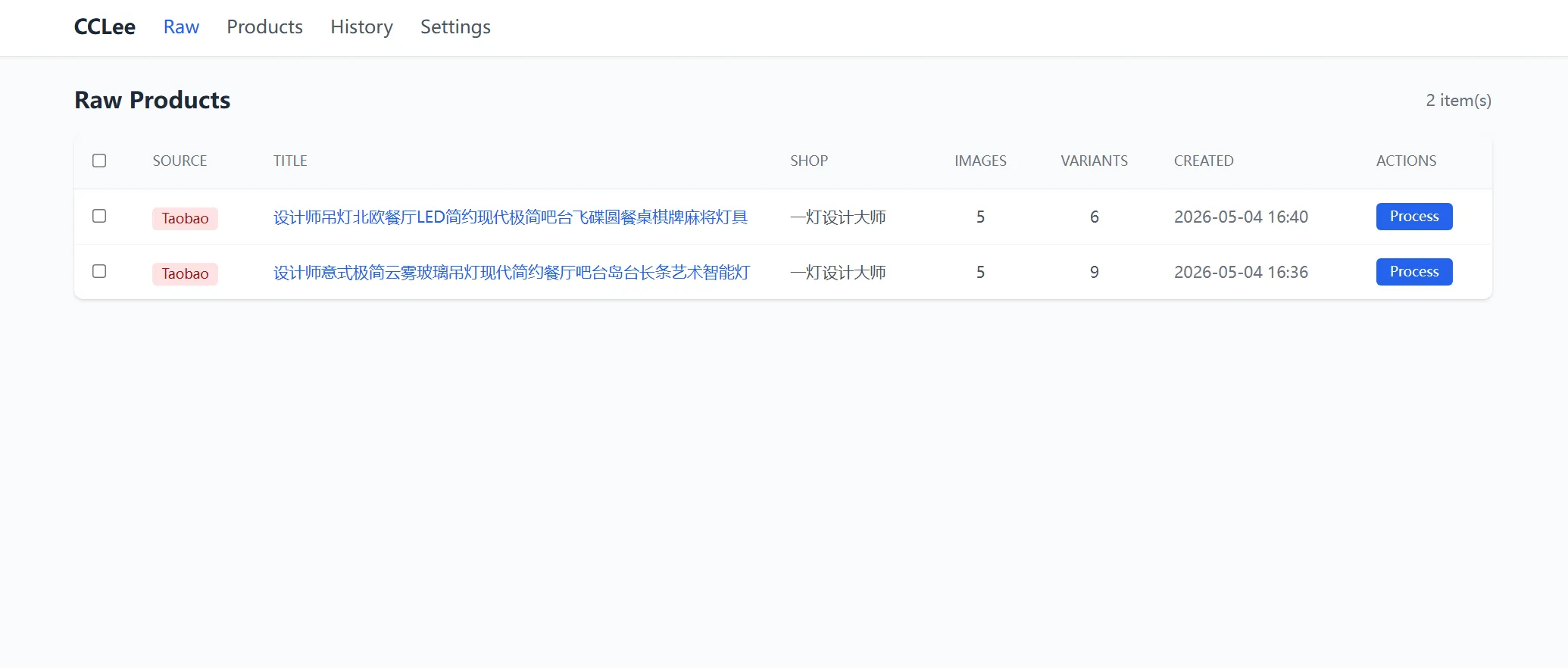
After scraping, data automatically appears on the Raw page.
- Process: click the Process button on any row. The system runs Vision image analysis → Text description generation → exchange rate pricing → attribute mapping. The row fades out when complete.
- Batch Process: select multiple rows and batch-trigger AI processing, showing progress "Processing 1/N..."
- Select All: one-click select all rows
- Title link: click to open the original platform product page
5. Review Products
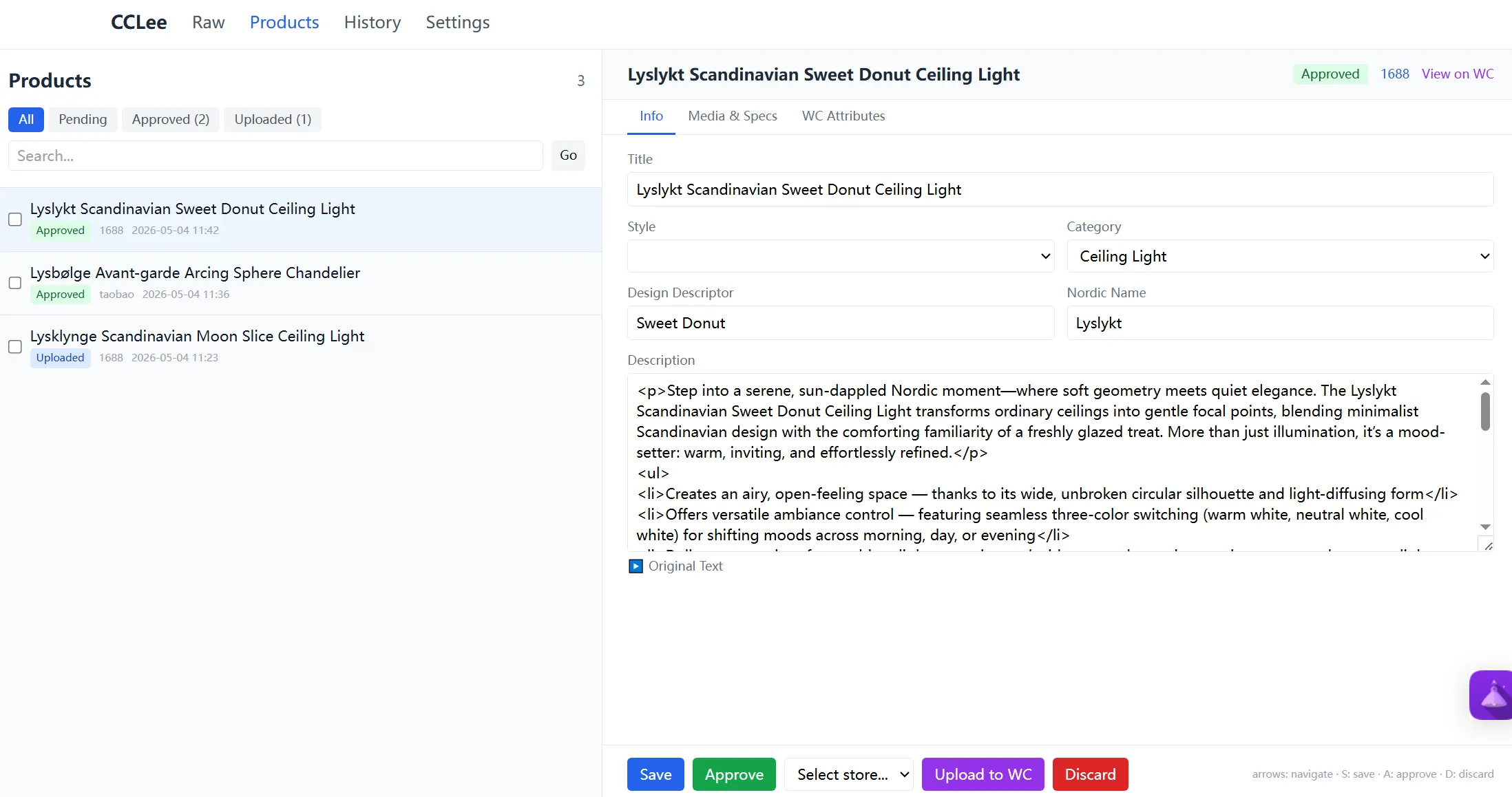
After AI processing, products appear on the Products page for human review. Split-panel layout: product list on the left, detail editing on the right, no page navigation needed.
Left panel
| Element | Function |
|---|---|
| All / Pending(N) / Approved(N) / Uploaded(N) | Filter by status tab, real-time count in parentheses |
| Search | Fuzzy search by English title |
| Checkbox + Approve / Discard | Batch approve or discard |
| ← / → | Pagination, 20 items per page |
Right panel
| Element | Function |
|---|---|
| Source | Jump to original platform product page |
| View on WC | Appears after publishing, jump to WC product page |
| Info / Media & Specs / WC Attributes | Three detail panels |
| ▶ Original Text | Expand to show original Chinese title + description for comparison |
| Markup input | Change markup multiplier, auto-recalculates all variant SGD prices |
| Save | Save current edits |
| Approve | Status → approved, auto-advance to next product |
| Store Selector | Select target store (only shows after approved) |
| Upload to WC | Publish to selected WooCommerce store (only shows after approved) |
| Discard | Discard product, requires confirmation, auto-advance to next |
Keyboard shortcuts: ↑↓ switch products · S save · A approve · D discard (auto-disabled when input is focused)
Full-Chain SEO for Data & Images
The system applies full-chain SEO optimization: images are auto-renamed to "style-description-category-room-sequence" format with alt-text on upload. English titles and descriptions are AI-generated with natural keyword inclusion.
6. Publish to WooCommerce
After approval, the publish toolbar appears. Select a target store, click Upload to WC. The system auto-executes: image SEO renaming and upload to WordPress media library, WooCommerce variable product creation (with all variants, attributes, tags, ACF fields, and WC category matching). After publishing, status changes to Uploaded and a View on WC link appears.
The same product can be published to different stores. Upload logs are recorded per store and fully traceable.
Pre-Publish Checklist
Make sure product information is fully reviewed before publishing, especially pricing and images. Post-publish changes require editing in the WooCommerce admin.
7. View History
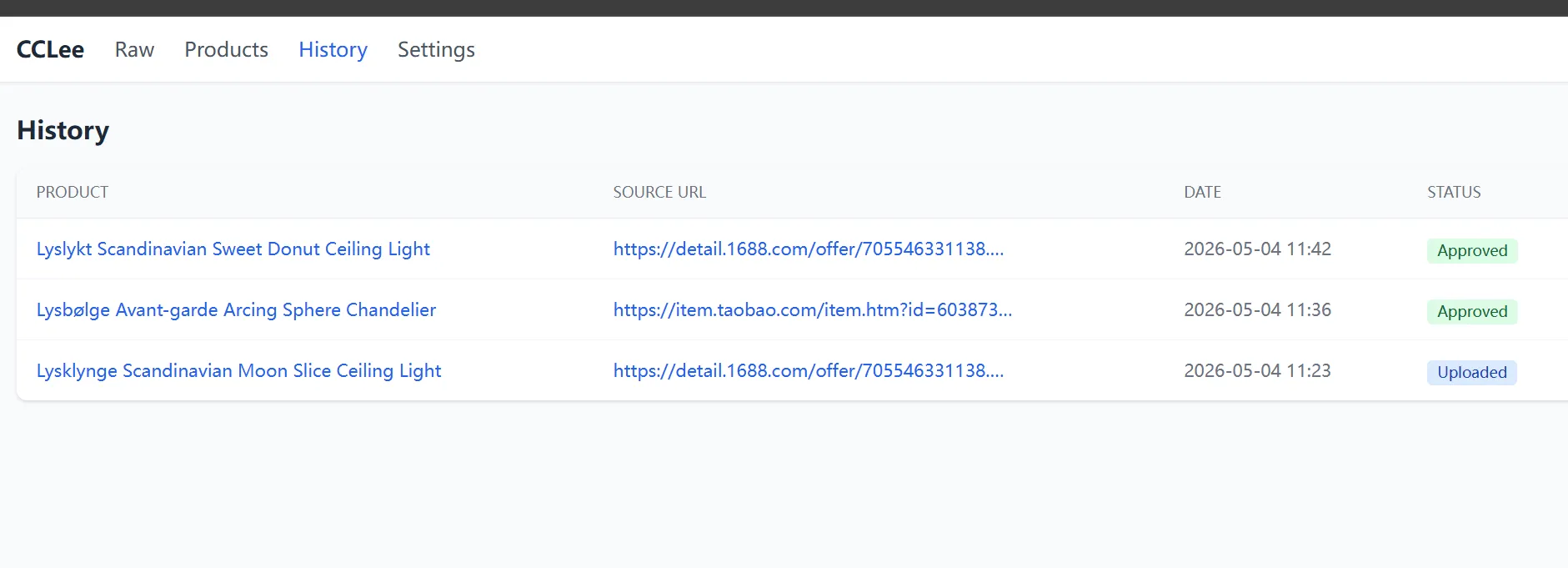
Reviewed products are displayed in a read-only table on the History page, filterable by status tab.
Product status flow:
| Status | Meaning |
|---|---|
| Pending | AI processed, awaiting human review |
| Approved | Review passed, ready to publish to WC |
| Uploaded | Published to WooCommerce |
| Discarded | Discarded (not shown in list) |
Click Product title to open the standalone Detail page. Click Source URL to open the original platform product page.
FAQ
What AI model do I need?
Recommended: GPT-4o (Vision + Text). The system supports any model compatible with the OpenAI API format, including Qwen, DeepSeek, etc. Just fill in the corresponding API Key, Base URL, and model name on the Settings page.
Which platforms are supported for scraping?
Currently supports Taobao, Tmall, and 1688. The extension auto-detects the current page's platform.
What happens if I scrape the same product twice?
The system deduplicates by platform + product ID. Re-scraping updates the existing record without creating duplicates.
How is pricing calculated?
The system auto-fetches real-time CNY→SGD exchange rates and calculates selling prices using configurable markup multipliers (Taobao default 4.5x, 1688 default 6.0x). Prices end in 8 automatically. You can adjust the Markup multiplier in the review interface or modify individual SKU prices. The review interface shows the full pricing breakdown: CNY original price → SGD conversion → × multiplier → rounded final price.
How many stores are supported?
No limit. Each store has independent WC credentials and WP accounts. Select any target store at publish time. Ideal for sellers managing multiple sites for bulk product distribution.