CCLEE OSS Guide: Sync WordPress Media to Alibaba Cloud OSS
CCLEE OSS is a WordPress plugin for Alibaba Cloud OSS: media library uploads — images, PDFs, videos, every attachment type — are automatically synced to your own OSS bucket, and frontend media URLs are rewritten to an OSS or CDN domain (images additionally get srcset and every thumbnail size covered). Files are served straight from OSS/CDN instead of your web server, so pages load faster.
The plugin is commercially licensed: your license token is bound to your site domain — paste it on the settings page to activate (verification is offline, so no constant connection to a license server is needed). Plugin updates are distributed from the CCLEE update server and are only available to sites with a valid license.
What CCLEE OSS Does for You
Faster media. Images are the biggest share of traffic on most pages, and attachment downloads eat bandwidth too. Once enabled, media files are served straight from your OSS/CDN domain — with a CDN acceleration domain, visitors download them from nearby edges and pages open faster.
A lighter web server. Image and attachment downloads no longer consume your server's bandwidth. Server resources stay with the site application and dynamic requests, so traffic peaks are easier to handle.
Fully automatic, zero changes to existing content. Uploads sync as you make them — images, PDFs, videos, all media types — and frontend URLs are rewritten automatically. Themes, the editor, and already-published posts need no changes; originals and every thumbnail size are covered for images.
A built-in safety net. Any OSS failure falls back to local storage and the site keeps running. Your media lives in your own bucket and the plugin never deletes data already in OSS — license expiry only sends new uploads back to local.
Who It's For
- Media-heavy sites: blogs, portfolios, WooCommerce stores (lots of product and variation images), sites offering PDF catalogs or downloads
- Site owners struggling with slow image loading or tight server bandwidth
- Users with an Alibaba Cloud account who want media in their own bucket (storage and traffic are billed by Alibaba Cloud at official prices — your data stays entirely yours)
Features at a Glance
| Feature | What it does |
|---|---|
| Upload-and-sync | Media uploaded in wp-admin (images, PDFs, videos, all types) is pushed to OSS automatically — no manual migration |
| Backfill existing media | One-click batch push for media that predates activation — with progress, pause/resume, and failed items listed for a clean retry |
| All sizes covered | Originals plus every generated thumbnail; sizes rebuilt by regenerate-thumbnails are covered too |
| Large-file support | Files over 10 MB (videos, archives) upload in parts automatically — reliable even on modest servers |
| Automatic URL rewrite | Original, srcset, and sized-image URLs point to your CDN domain (or the bucket's public domain if none is set); attachment download links are rewritten too |
| Stored-URL replacement (optional) | Batch-convert media URLs already saved in the database to your OSS/CDN domain — backed up first, with one-click rollback |
| Local copy management | Pure-cloud mode removes local copies once sync is confirmed, and existing media can be offloaded in bulk; files are fetched on demand when an operation needs them |
| One-click migration back | Pull everything from OSS back onto the server when leaving the plugin or moving sites |
| Delete sync (optional) | Optionally delete the OSS objects when a media attachment is deleted |
| Silent fallback | Any OSS failure falls back to local storage without breaking native WordPress behavior |
| Licensed updates | Update packages come from the CCLEE update server with sha256 verification — valid licenses only |
Quick Start
Prerequisites
- WordPress 6.4+, PHP 8.0+
- An Alibaba Cloud account with a bucket created (read/write permission: public-read)
- A license token issued by CCLEE for your site domain
Step 1: Install and Activate the Plugin
- In wp-admin, go to Plugins → Add New → Upload Plugin
- Choose
cclee-oss.zip→ click Install Now - Click Activate when the install finishes
Step 2: Paste Your License Token
- Go to Settings → CCLEE OSS
- Paste the license token delivered by CCLEE into License Token
- Click Save Changes
Tokens are bound to your domain
The token is issued for your site domain (compared after ignoring www and the port). On save, the plugin verifies the signature and checks the domain on the spot — a mismatch is rejected. If your site moves to a new domain, contact CCLEE for a new token.
Step 3: Create a RAM Sub-Account (Least Privilege)
The plugin only needs two permissions: write and delete objects in your bucket. Create a dedicated RAM user with least privilege (create the policy → create the user → grant it; about 10 minutes) — the full walkthrough lives in Alibaba Cloud RAM Setup for CCLEE OSS.
You'll end up with an AccessKey ID / Secret pair — you'll need them in the next step.
Step 4: Fill in the OSS Settings
Back on Settings → CCLEE OSS, fill in:
| Setting | Value |
|---|---|
| AccessKey ID / AccessKey Secret | The keys saved in Step 3 |
| Bucket | Your bucket name |
| Endpoint | The public endpoint of the bucket's region (see the bucket overview page), e.g. oss-ap-southeast-1.aliyuncs.com (Singapore); on an ECS instance in the same region, prefer the internal endpoint |
| CDN Domain | Optional. If your bucket has a CDN acceleration domain, enter it and media URLs will use it; leave empty to use the bucket's public domain |
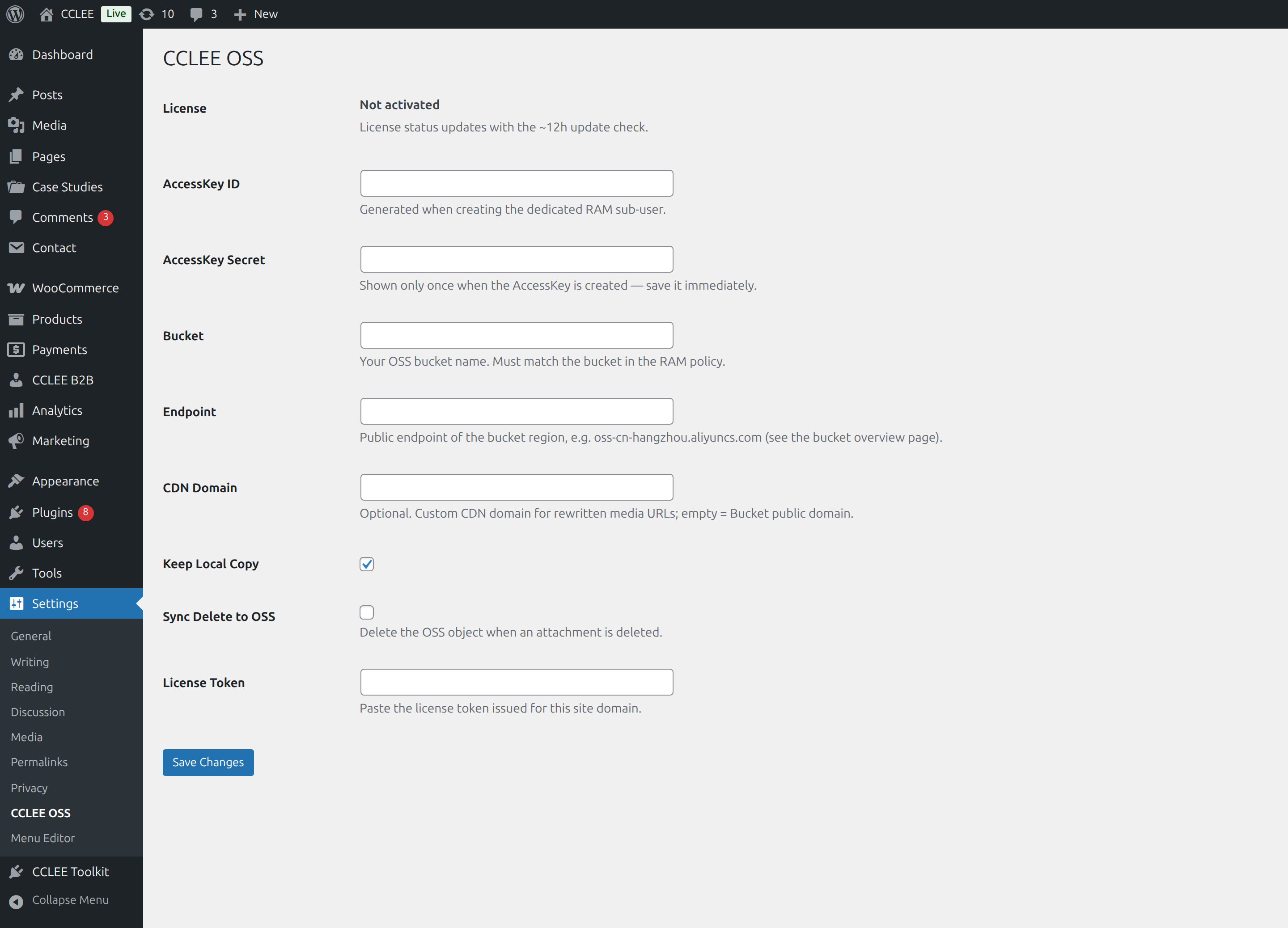
Then click Save Changes.
Step 5: Verify with a Test Upload
- In wp-admin, go to Media → Add New and upload a test image
- Click the image in the media library to see its file URL (or open a frontend page that shows it)
- If the image URL points to your OSS/CDN domain, everything is configured correctly
License & Updates
Expiry and Renewal
- The token carries an expiry date; 14 days before it expires, a renewal notice appears at the top of wp-admin
- To renew, just paste the new token on the settings page and save — nothing else to do
What Happens on Expiry or Revocation
The plugin degrades gracefully — it never performs destructive actions:
- New uploads are stored locally and the site keeps running normally
- Files already uploaded to OSS and their URLs are unaffected; the frontend keeps serving them as before
- Nothing in your bucket is ever deleted
Offline Grace Period
License status travels with the plugin's update check (about every 12 hours). A temporary network outage does not disable the plugin immediately — you get a 14-day grace period counted from the last successful check, and connectivity restores full status automatically.
Plugin Updates
- The WordPress update check runs automatically; when a new version ships, update normally from the Plugins page
- Update packages are verified by sha256 on download — a mismatch aborts the install
- Only sites with a valid license receive new versions
Behavior Toggles
| Toggle | Default | What it does |
|---|---|---|
| Keep Local Copy | On | Keep local copies after sync. Switching off requires backfill and stored-URL replacement first; once off, new uploads are removed locally as soon as their sync is confirmed |
| Sync Delete to OSS | Off | When an attachment is deleted, also delete the OSS objects (original + all thumbnails) |
Local files are the safety net
If upload, delete, or URL rewriting fails at any point, the plugin silently falls back to native WordPress behavior (files stay local) — an OSS outage never takes your site down.
Pure-Cloud Mode: Media Lives Only in OSS
Short on disk space? Stop keeping media copies on your server altogether. Three steps, in order — the plugin's safety guards keep the sequence from being broken:
- Backfill existing media: click "Backfill" on the settings page to push everything that existed before activation (with progress, pause/resume)
- Run the stored-URL replacement: batch-convert the media links saved in your database to your bucket/CDN domain — everything is backed up first, and deletion tasks stay locked until the replacement is verified
- Remove the local copies: switch "Keep Local Copy" off — from then on, new uploads are removed locally as soon as their sync is confirmed; use the "Offload existing media" task to clear existing media in bulk (edit history stays on the server)
Two guards run through the whole flow: before removing anything, the plugin checks every cloud copy and re-pushes any that don't match; and as long as any database link hasn't been replaced and verified, every deletion task refuses to start — images won't break no matter what order you do things in.
Operations that need a local file keep working
Regenerating thumbnails, cropping or rotating in the image editor, PDF thumbnails — anything that needs the actual file automatically fetches it from the bucket for the duration of the operation and cleans up afterwards. Nothing to do by hand.
Want to move back to local storage?
The "Restore media from OSS" task pulls every bucket file back onto your server (safe to run repeatedly); if you have run the URL replacement, the "URL rollback" task restores your database links to local URLs. After those two steps you can deactivate the plugin — this is also the way out when moving sites or switching buckets.
FAQ
What does CCLEE OSS cost?
Two parts: the plugin license is purchased from CCLEE, while storage and traffic for your media files are billed by Alibaba Cloud directly at official prices — the data sits in your own bucket, so CCLEE adds no markup.
Do non-image files (PDFs, videos, attachments) get synced too?
Yes. Every file uploaded through the media library is synced to OSS, and attachment download links are rewritten to OSS/CDN automatically. Thumbnail sub-sizes and srcset coverage are an extra layer that applies to images only.
Will large files (videos) sync without problems?
Yes. Files over 10 MB are automatically uploaded in parts, so even a modestly configured server pushes big media through reliably; anything that fails to push shows up in the failures list on the settings page — just work through the list and re-push.
Are thumbnails (sub-sizes) uploaded to OSS too?
Yes. The original plus every generated size is pushed, including sizes rebuilt by plugins like regenerate-thumbnails, and the srcset URLs for each size are rewritten to OSS as well.
Will images already on OSS be lost when the license expires?
No. On expiry or revocation the plugin degrades gracefully: only new uploads switch to local storage. Files already on OSS and their URLs stay exactly as they are, the frontend keeps serving images, and nothing is deleted from your bucket.
Does an OSS upload failure break publishing?
No. If upload, delete, or URL rewriting fails at any point, the plugin silently falls back to native WordPress behavior (the file stays in the local media library) — wp-admin and the frontend are unaffected.
Is the license still valid after a domain change or site migration?
Tokens are bound to the site domain. After a domain change the old token will fail verification — contact CCLEE for a re-issue against the new domain, then paste the new token and save.
Can I delete local copies and keep only OSS?
Yes. After completing "Backfill existing media" and the stored-URL replacement on the settings page, switch "Keep Local Copy" off to enter pure-cloud mode: new uploads are removed locally once their sync is confirmed, and existing media is cleared in bulk with the "Offload existing media" task. Before removing anything the plugin verifies every cloud copy, and deletion tasks refuse to start while database links are still unfinished; to come back, the "Restore media from OSS" task migrates everything to local again.
Is stored-URL replacement required?
No — it's optional. In the default mode the database always stores local links and the frontend rewrites them on the fly, so everything works without replacement. It only becomes a prerequisite when you enter pure-cloud mode (removing local copies): stored links then correspond directly to the cloud files, and legacy links the on-the-fly rewrite can't reach (old http:// links, links inside page-builder data) get converted too. Everything is backed up before replacement, with one-click rollback anytime.
Do I need to change the database when switching bucket or CDN domain?
In the default mode, no: the database always stores local links, the frontend rewrites them to your OSS/CDN domain on the fly, and switching domains is a single setting change. If you have run the stored-URL replacement, run "URL rollback" first to restore local links, switch the domain, and re-run the replacement if needed.
How do I move everything back to local storage and stop using the plugin?
Two steps: run "Restore media from OSS" to pull every bucket file back onto the server, then — if you have run the URL replacement — run "URL rollback" to restore local links in the database. After that you can deactivate the plugin with your data fully intact.
Should the endpoint be public or internal?
On an Alibaba Cloud ECS instance in the same region as the bucket, prefer the internal endpoint (faster, no public traffic); in all other cases (external servers, different regions) use the public endpoint. Both are listed on the bucket overview page.
How do I get plugin updates?
The WordPress update check runs automatically (about every 12 hours); when a new version is available, update normally from the Plugins page — no manual downloads. Updates are only available to sites with a valid license.
Get a License & Support
CCLEE OSS is licensed per site domain, with purchase, renewal, and re-issue for domain changes available. Contact us to get licensed:
Contact CCLEE