Web App User Guide
This guide covers the Life web app (life.ccleeai.com). The web version is the most complete: the WeChat mini program focuses on quick logging, while chat mode, stats charts, budgets, template backfill, and account deletion all live here. Both use the same account - data syncs in real time.
The web interface is in Chinese - key on-screen terms are kept in Chinese (in parentheses) so you can find them.
Quick Start
1. Sign in (first sign-in registers)
Open life.ccleeai.com, enter your phone number → tap "Send code" (发送验证码) → enter the SMS code → tap "Sign in" (登录). Your first sign-in registers the account automatically - no separate sign-up step.
2. Log your first entry
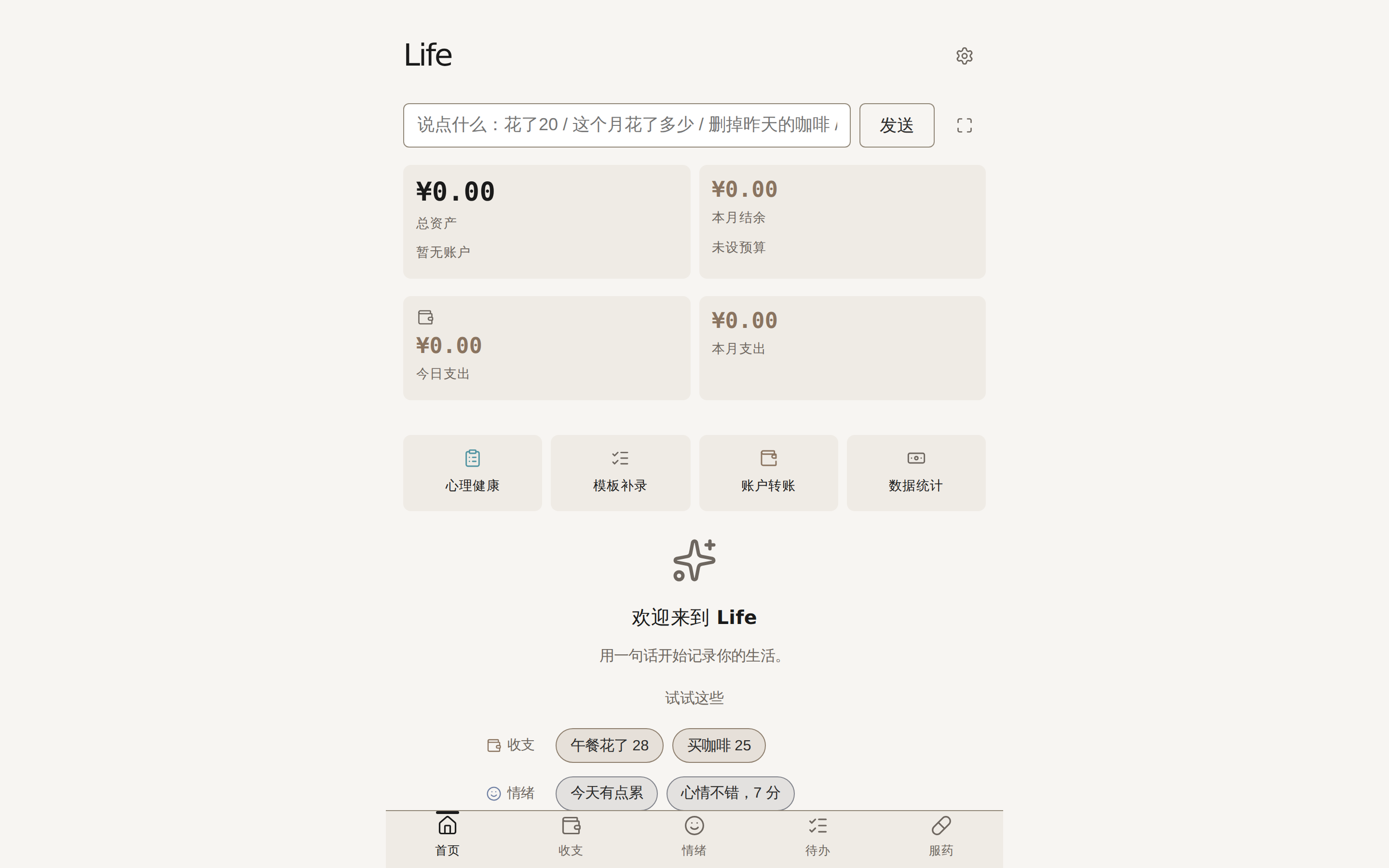
The home input box reads "说点什么:花了20 / 这个月花了多少 / 删掉昨天的咖啡 / 把午餐改成40" - just say it like a message. The result card shows what was recognized instantly. Nothing is saved before you confirm; undo mistakes or fix the category on the card.
Open registration
Life is currently open to everyone: any phone number with SMS verification can sign in, no invite needed. New users get example prompts to start with - and every write goes through a confirmation card, so it's safe to just say it.
Logging and Queries (Home)
What you can say (examples from the home empty state):
| What you want | What to type (Chinese example) |
|---|---|
| Log an expense | 午餐花了 28 ("lunch cost 28") / 买咖啡 25 ("coffee 25") |
| Log a mood | 今天有点累 ("a bit tired today") / 心情不错,7 分 ("feeling good, 7/10") |
| Log a to-do | 明天交报告 ("report due tomorrow") / 周五记得复诊 ("clinic on Friday") |
| Log medication | 吃了感冒药 ("took cold meds") / 维生素 1 片 ("1 vitamin tablet") |
| Fix / remove | 删掉昨天的咖啡 ("delete yesterday's coffee") / 把午餐改成40 ("change lunch to 40") |
| Query | 这个月花了多少 ("how much this month?") |
| Set a budget | 餐饮预算 2000 ("dining budget 2000") |
Home dashboard: total assets, this month's balance (with budget headroom), today's / this month's expenses, and recent records (with a to-do completion badge, e.g. 待办 3/5).
Every write goes through a confirmation card:
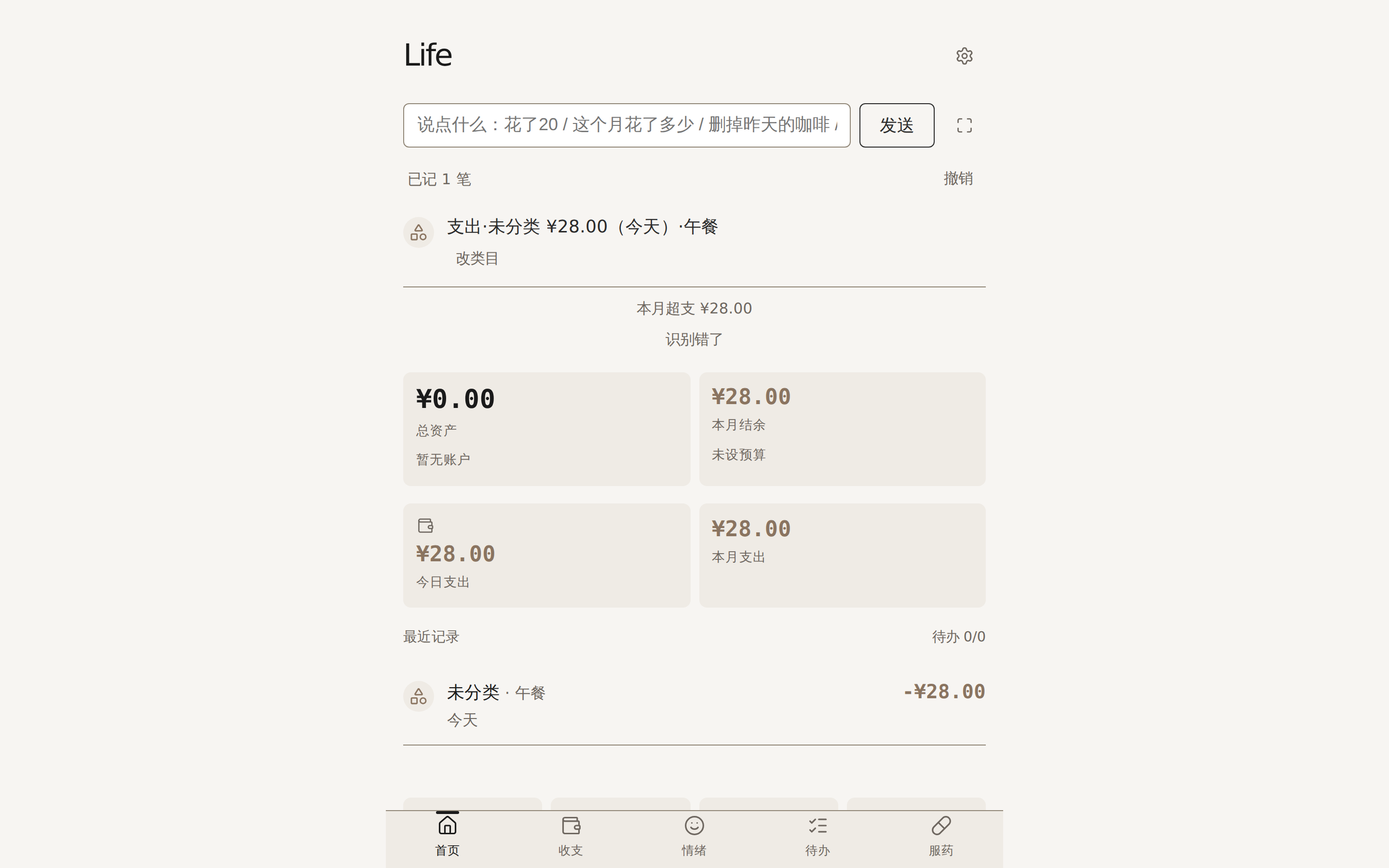
- Logged: shows "已记 N 笔" (N entries logged) - tap Undo (撤销) or Change category (改类目)
- Update / delete: candidates are listed; tap "Confirm update / Confirm delete" per record (deletion is permanent)
- Batch updates: the affected range is previewed first (e.g. "July taxis"), then applied in one go
- Not found: tap "补充" (add a hint) and write what you originally meant
- Wrong recognition: tap "识别错了" and tell it what it should have been - Life learns and gets more accurate (see Corrections)
Chat Mode
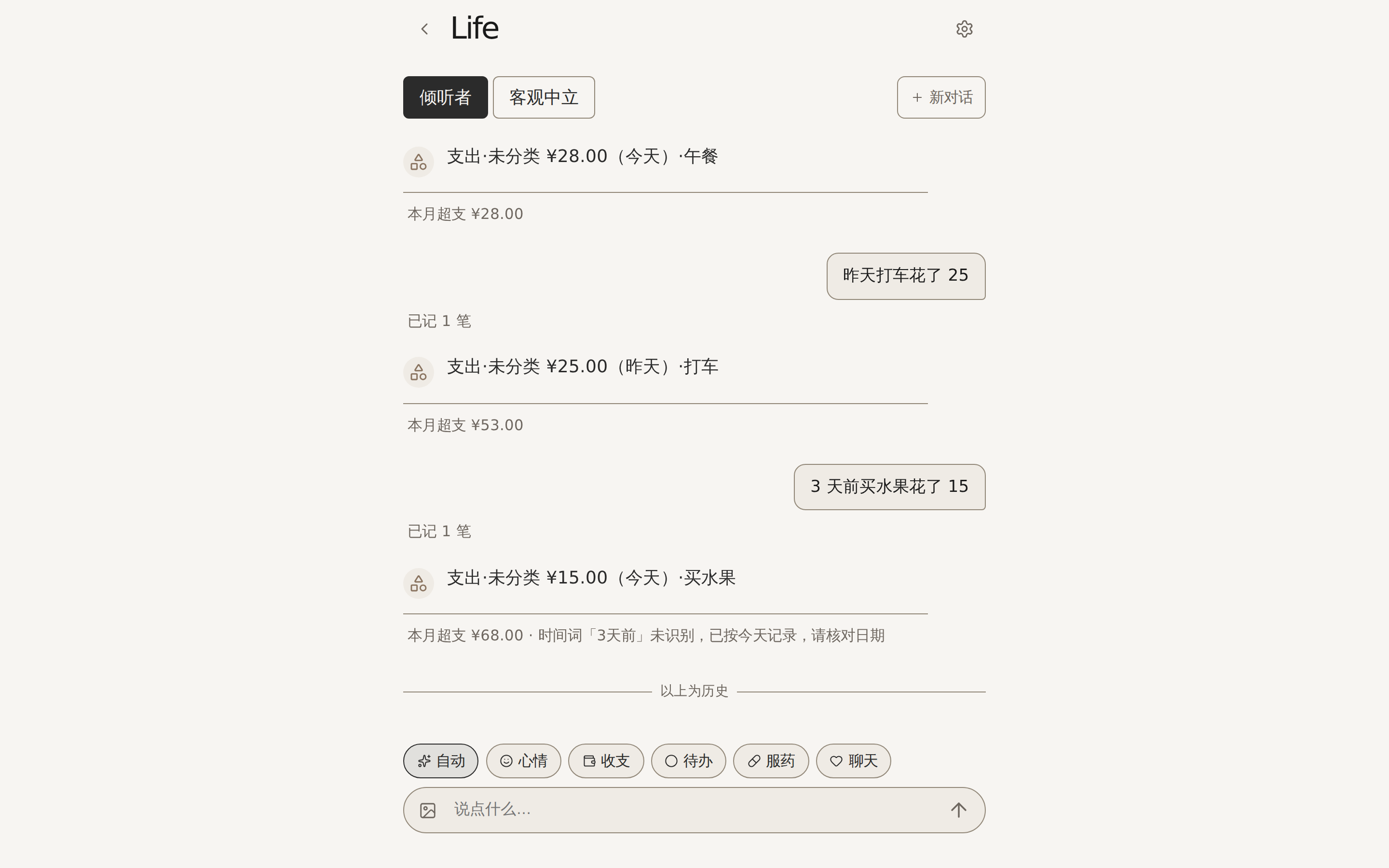
Enter via the chat icon next to the home input box ("纯聊天模式 · 可发图片记小票" - pure chat, accepts photos).
- Input modes: 自动 (auto) / 心情 (mood) / 收支 (expenses) / 待办 (to-dos) / 服药 (medication) / 聊天 (chat). "自动" is the default - logging, queries, and fixes all work; switch to "聊天" for pure conversation and queries only
- Send photos: receipts and bill screenshots are read automatically and logged; add a text note if you like
- Companion style: 倾听者 (listener) or 客观中立 (neutral), switchable anytime
- New conversation: clears the current thread to start fresh; history stays viewable (see the "以上为历史" divider)
A note on safety
If relevant signals appear in chat, the page shows the psychological assistance hotline 12356 (nationwide, 24 hours). This reminder is always active and not affected by any setting.
Stats and Budgets
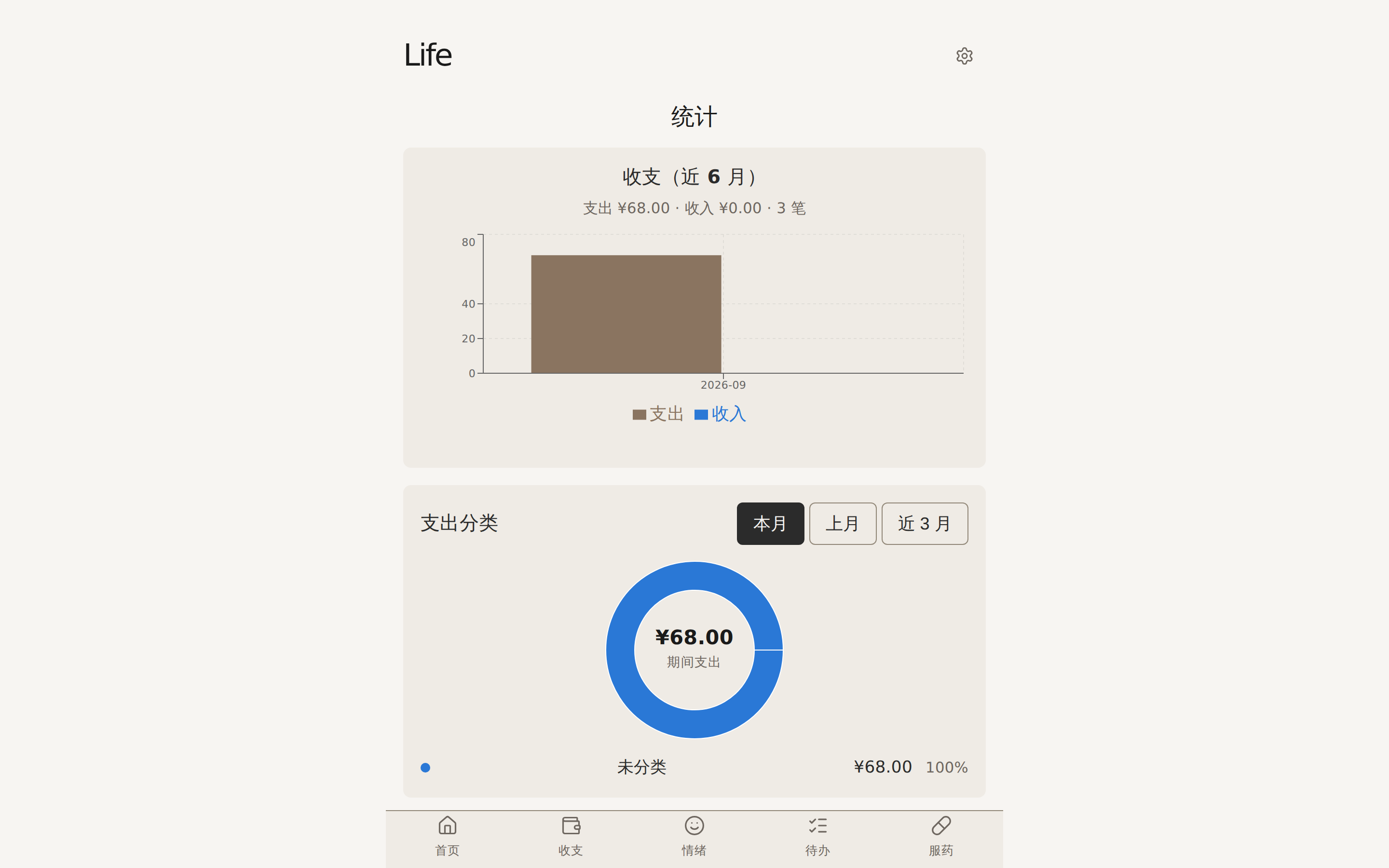
Enter via the "数据统计" shortcut on the home page:
- 收支(近 6 月): expense / income trends over the last 6 months
- 支出分类: spending categories as a donut chart; switch between this month / last month / last 3 months
- Budget comparison: per-category budget vs. actual - fill it in under "批量设置 / 编辑预算" on the stats page, or just say "餐饮预算 2000" on the home page
- 情绪趋势(近 30 天): average score and low / mid / high band distribution
- To-do completion rate
Managing Expenses (Expenses tab)
The second bottom tab "收支" opens the expense records page:
- Time filter: this month (calendar panel) / last 3 months / last 6 months / this year / all
- Inline editing: tap a record to change category, amount, currency, or note
- Category management: create your own categories with optional anchor words ("锚点词,帮 AI 识别") - e.g. a "pets" category anchored on "狗粮/猫粮" (dog food / cat food), so "dog food 120" auto-categorizes
- Deletion requires per-record confirmation ("删除该收支记录?")
Accounts, Transfers, and Lending
Enter via the "账户转账" shortcut on the home page:
- Add account: name + currency (can't be changed later); optional anchor words (e.g. "招行/储蓄卡") help recognition
- Transfers: moving money between your own accounts - not counted as income or spending; cross-currency transfers need the received amount
- Balance adjustments: interest / fees / opening balance / reconciliation fixes; negative amounts allowed, not counted in income/spending; pick a reason from the fixed list
- Transfer / adjustment entries can be deleted (account balance rolls back accordingly)
- Lending: say "借出100" ("lent out 100") or "还了 50" ("paid back 50") to log loans and repayments; ask "某某还欠多少" ("how much does X still owe") anytime
Mood and Stress Self-Checks
Enter via the "心理健康" shortcut on the home page:
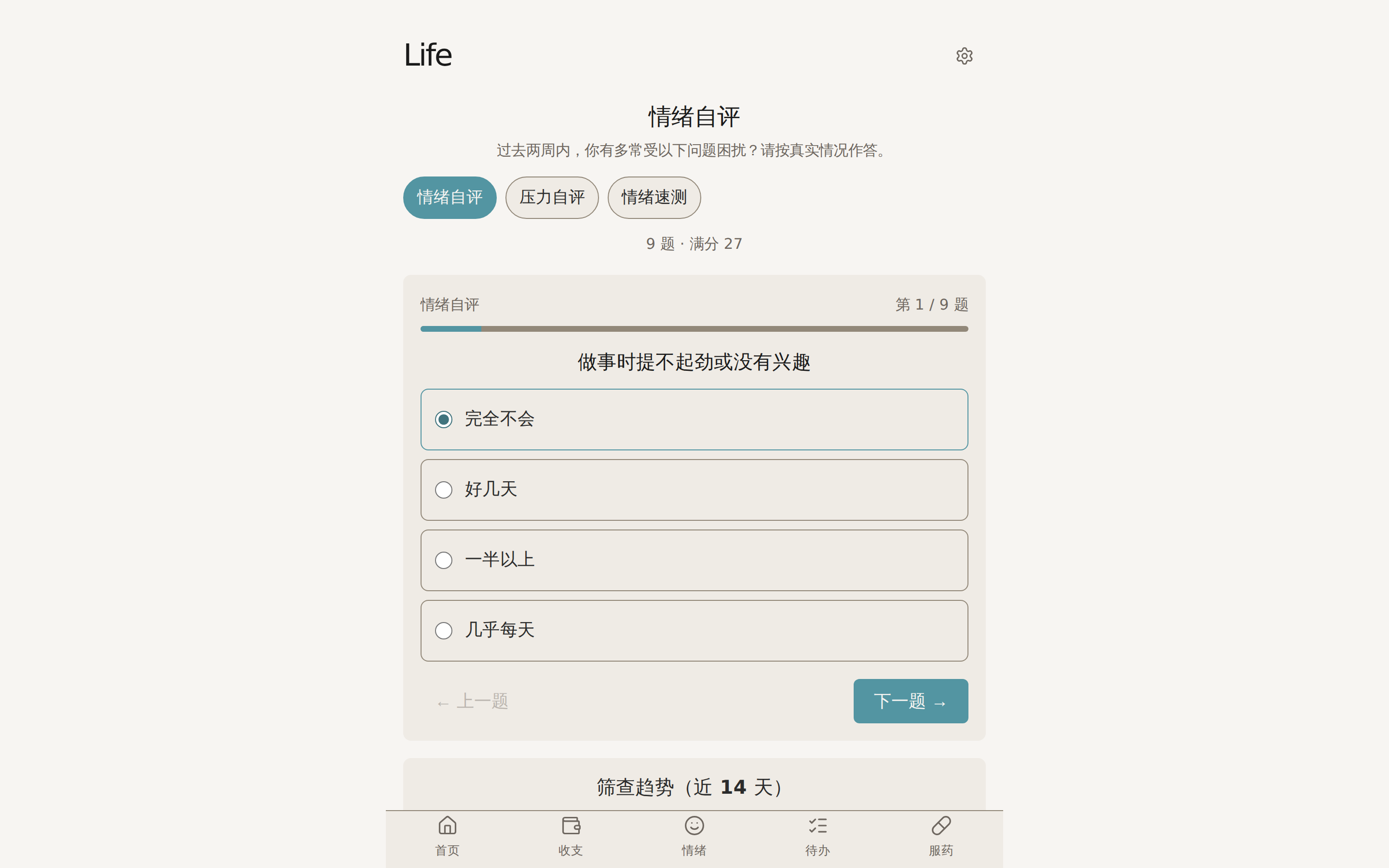
- Pick one self-check: 情绪自评 (Mood Self-Check) / 压力自评 (Stress Self-Check) / 情绪速测 (Quick Mood Check) - the page shows "N questions · max M points"
- One question per screen - answer honestly about "the past two weeks" (完全不会 / 好几天 / 一半以上 / 几乎每天: not at all / several days / more than half the days / nearly every day)
- Results appear instantly (e.g. "steady", "elevated stress - consider seeking support"); tap "再测一次" to retake
- "历史记录" keeps every past result; "筛查趋势(近 14 天)" (14-day trend) shows changes over time
Where do the questions come from - are they professional?
The three self-checks are adapted from internationally standardized questionnaires: 情绪自评 corresponds to PHQ-9, 压力自评 to GAD-7, and 情绪速测 (PHQ-4) is a short combination of both. They are widely used for initial self-assessment of mood and stress; scoring and result bands are computed server-side.
Please read
Results are for self-assessment only and are not a medical diagnosis; if something feels heavy, please seek professional help. If you are in distress or having thoughts of harming yourself: you don't have to face it alone - call the psychological assistance hotline 12356 (nationwide, 24 hours); in an emergency, go to the nearest hospital emergency department or mental health center.
Templates and Batch Backfill
Enter via the "模板补录" shortcut - built for missed recurring entries (rent, daily medication, salary):
- Create a template: pick a type (expenses / mood / to-dos / medication) and fill in the fixed content (e.g. "rent 3000", "二甲双胍 1 片")
- Batch backfill: pick a template → set "entries per day / number of days / end date" → preview the range (e.g. 7月1日 ~ 7月31日 · 1 entry per day · 31 total) → confirm
- Only past dates are backfilled, never future ones; entries are not de-duplicated - submitting twice creates duplicates (the confirm dialog says so)
Corrections
Enter from Settings or the home shortcuts. Every correction you make on a result card (changing a category, "识别错了") becomes a teaching example automatically, and Life applies your phrasing going forward. This page lists accumulated examples (e.g. "pet snacks → pets") and lets you delete any you no longer want taught.
Settings and Account
Open via the gear icon in the top-right corner:
- Theme: follow system / light / dark
- Proactive care: how often chat proactively checks in on you (常规 / 适度 / 关闭 - regular / moderate / off); safety-signal reminders are always on
- Balance hints: after logging an expense, append this month's balance and budget headroom to the confirmation (show / hide)
- Default currency: used when a log entry doesn't mention one (no exchange-rate conversion)
- Nickname, sign out
Deleting your account
Settings → bottom "危险操作" → "注销账号": after SMS verification, all data is permanently deleted (expenses, mood, medication, lending, accounts, etc.) and cannot be recovered. To remove just a few records, use per-record deletion instead - don't delete the whole account.
FAQ
How do the web app and mini program relate? Same account, same data, synced in real time. The mini program is for quick logging; the web app has everything (chat mode, stats, budgets, template backfill, account deletion). A good combo: log on the mini program, review stats on the web.
What about switching phones or devices? Data lives on the server. Open life.ccleeai.com in any browser, sign in with your phone number and an SMS code - all history is there.
What if the AI misreads me? Four layers of fixes, getting more accurate over time: "Undo / Change category" rescues the record; "识别错了" teaches it for next time; "补充" helps it locate what it missed; and the Corrections page manages long-term habits.
Is my data safe? Can I delete everything? Sensitive content is stored encrypted and system logs never record your raw text (see Privacy & Data Security). Delete individual records one by one; to wipe everything use "注销账号" - permanent and unrecoverable.
Are the self-checks a medical diagnosis? No. Results are for self-understanding only, not a medical diagnosis; please seek professional help if something feels heavy (hotline 12356 is shown in the app).
Which currencies are supported? Is there automatic conversion? CNY / USD / EUR / JPY / HKD / TWD are supported. Entries are recorded in the currency you mention, stats are grouped per currency, and no exchange-rate conversion is applied.